
The Oldest Rule of Human Progress
Look back through history — not at the famous names, but at why those names survived at all.
Caesar’s campaigns. Aristotle’s philosophy. Da Vinci’s observations. Einstein’s thought experiments. We know these people not just because of what they did, but because of what was written down. Entire civilisations have vanished — brilliant cultures, remarkable individuals, decades of accumulated wisdom — not because they lacked knowledge, but because that knowledge was never recorded. Or recorded on something fragile. Or recorded in a language no one preserved.
The rule is ruthless and simple: if it was not written down, it did not happen. And if it happened but was not structured and connected in a way others could access — it might as well not have happened either.
Now here is the question I want you to sit with for a moment.
You have been learning for decades. You have developed expertise, built intuitions, made mistakes that cost you dearly and taught you things no course ever could. You have synthesised ideas across disciplines. You have a way of seeing your field — your industry, your craft, your domain — that is genuinely yours. Unique. Hard-earned.
When you are gone, what survives?
For most people, the honest answer is: almost nothing structured. Some colleagues will remember you. Perhaps a few documents, a folder of old presentations, a disorganised archive of emails. But the actual texture of your thinking — the connections you made, the frameworks you built, the contextual understanding that makes expertise real — that disappears.
This article is about why that no longer has to be true. And how a surprisingly simple concept, combined with a tool I have been building called The Curator, is making knowledge immortality achievable for anyone.
A Uniquely Human Ability — and Its Invisible Flaw
Let me take a step back, because this is important.
One of the most extraordinary things about human beings is our capacity for knowledge compression. A surgeon with thirty years of experience does not just know more facts than a medical student. He or she has compressed decades of pattern recognition, contextual judgment, and synthesised understanding into something that functions almost like instinct. That expertise is genuinely rare. It took decades to build. In many ways, it cannot be replicated by reading books — it had to be lived.
The same is true for entrepreneurs, researchers, teachers, engineers, writers, leaders of every kind. The knowledge is not just in the facts. It is in the connections. In knowing which things matter and which do not. In recognising patterns that only become visible after you have seen the same situation unfold a hundred times in a hundred different contexts.
This is the uniquely human advantage. And it has one invisible flaw: it lives almost entirely inside a biological system with a finite lifespan.
The knowledge compounds beautifully inside a human mind. The tragedy is that the compounding stops — and largely reverses — the moment the mind is no longer available.
What if there were a way to externalise that compounding? To keep building it, layer by layer, over years — in a form that others can access, learn from, and continue?
That is the idea at the heart of what I want to share with you.
The Spark: Andrej Karpathy’s Quietly Radical Idea
If you follow the world of artificial intelligence, you know Andrej Karpathy. Former director of AI at Tesla, one of the founding members of OpenAI, one of the most gifted explainers of deep learning alive today. The kind of thinker whose ideas tend to be simple on the surface and quietly profound underneath.
A while back, Karpathy shared a small document on GitHub — almost a thought experiment more than a finished product. He described something he called the LLM Wiki pattern. And when I read it, something clicked.
The idea was this.
Most people who use AI with their documents experience it the same way: you upload a collection of files, you ask a question, and the AI searches through your documents and generates an answer. This approach — known in technical circles as Retrieval-Augmented Generation, or RAG — is how most “chat with your documents” tools work. It is useful. But it has a deep structural limitation.
Every time you ask a question, the AI rediscovers the answer from scratch. Nothing builds up. The knowledge does not compound. Ask today, ask again next year — the AI starts from zero both times. Nothing was learned. Nothing was integrated. The system has no memory of synthesis.
Karpathy’s insight was to flip this completely.
Instead of retrieving from raw documents at query time, what if you used AI to continuously build and maintain a persistent wiki — a structured, interlinked collection of simple text files that sits between you and your raw sources? When you add a new article or document, the AI does not just index it. It reads it, extracts the key knowledge, and integrates it into everything that already exists — updating pages, adding connections, noting where new information confirms or contradicts what was previously known.
“The tedious part of maintaining a knowledge base is not the reading or the thinking — it’s the bookkeeping.” — Andrej Karpathy
The knowledge is compiled once and kept current. It compounds with every source you add.
He called this a wiki — not because it looks like Wikipedia, but because it functions like one. A living, growing, interlinked structure where the connections between ideas are as valuable as the ideas themselves.
And then he made one more observation that stuck with me. The whole system, he said, is nothing more than a folder of simple text files. No database. No subscriptions. No complex infrastructure.
Just markdown files.
What Is a Markdown File — and Why It Matters
For those unfamiliar with the term: a markdown file is simply a text file written in a specific, readable format that both humans and computers understand well. If you have ever used bold text in a message by wrapping words in asterisks, or created a heading with a hashtag symbol, you have used markdown.
What makes markdown special for this purpose is a combination of properties that nothing else quite matches.
The files are plain text — which means they will be readable by any device, any application, any operating system, fifty years from now. There is no proprietary format that can become obsolete. No software company that can go out of business and take your data with it.
They are extraordinarily lightweight. You can have tens of thousands of markdown files and store all of them on a USB key with room to spare. Storage is simply not a constraint.
They are understood remarkably well by modern AI language models. The structure, the headers, the links between files — all of it is natively legible to the same systems that power the best AI assistants in the world today.
And critically: they live on your computer. Only on your computer, unless you decide otherwise. No cloud account required. No subscription. No platform that can lock you out or change its terms. Your knowledge, in a format that will outlast every app you have ever used.
Each markdown file in this framework is what you might call a node — a page about a specific person, concept, idea, or source document. And each node can connect to other nodes through simple links, written as [[concept-name]]. These connections are the architecture of a second brain. They are what transforms a folder of text files into something that thinks.
Obsidian: Making the Invisible Visible
This is where a free application called Obsidian enters the picture — and it is worth understanding what it does, because it is part of what makes this whole system magical.
Obsidian is, at its core, a markdown file editor. You point it at a folder of markdown files — called a vault — and it reads them, displays them beautifully, and lets you navigate and edit them. So far, that sounds like a simple note-taking app.
But Obsidian does one thing that changes everything: it renders your [[links]] as a visual graph.
Open the graph view in Obsidian, and you see your knowledge. Not as a list. Not as folders. As a living map — nodes floating in space, connected by lines that represent the relationships between ideas. The more connections a node has, the more central it appears. Clusters form around the topics you have thought most deeply about. Isolated nodes reveal ideas you have not yet connected to anything else.
It is one of the most striking things I have ever seen in a software application. You look at this graph and you see, visually and directly, the shape of what you know.
Obsidian is completely free. It does not require an account. It runs entirely on your local machine. And it reads exactly the same markdown files that form your second brain — no import, no export, no conversion required.
The Missing Link: Why This Was Still Hard
Here is where I have to be honest about a gap.
Karpathy’s concept is elegant. Obsidian is beautiful. But building and maintaining this kind of structured, interconnected wiki — even with AI assistance — is genuinely difficult for most people.
You need to understand how to structure the files. You need to know how to prompt an AI to generate them correctly. You need to manually manage updates, check for broken links, maintain consistency across hundreds of nodes. Even for someone technically comfortable, doing this at scale — across years of content, dozens of topics, thousands of documents — is an enormous ongoing burden.
And for anyone without a technical background, the whole thing is simply inaccessible.
This is the gap that The Curator was built to close.
The Curator: A Swiss Army Knife for Your Second Brain
The Curator is an open-source application that runs locally on your computer. It is available at github.com/talirezun/the-curator. Installation is a single command. The setup takes under fifteen minutes. And from that point forward, the entire process of building, growing, maintaining, and exploring your second brain is managed through a clean, browser-based interface — no technical knowledge required.
The core philosophy of The Curator is what I call curation, not retrieval. Unlike standard AI tools that rediscover your documents every time you ask a question, The Curator builds a persistent, compounding wiki. Every new source you add does not just exist alongside what came before — it integrates with it. Existing pages get updated. New connections get established. Contradictions get flagged. The synthesis deepens.
This is the crucial distinction, and it mirrors the way human expertise actually works. A surgeon does not start from zero every time she sees a new patient. She applies accumulated understanding, refined by every case she has ever seen. The Curator builds knowledge the same way.
Let me walk you through how it actually works — section by section.
Domains: The Architecture of Your Knowledge
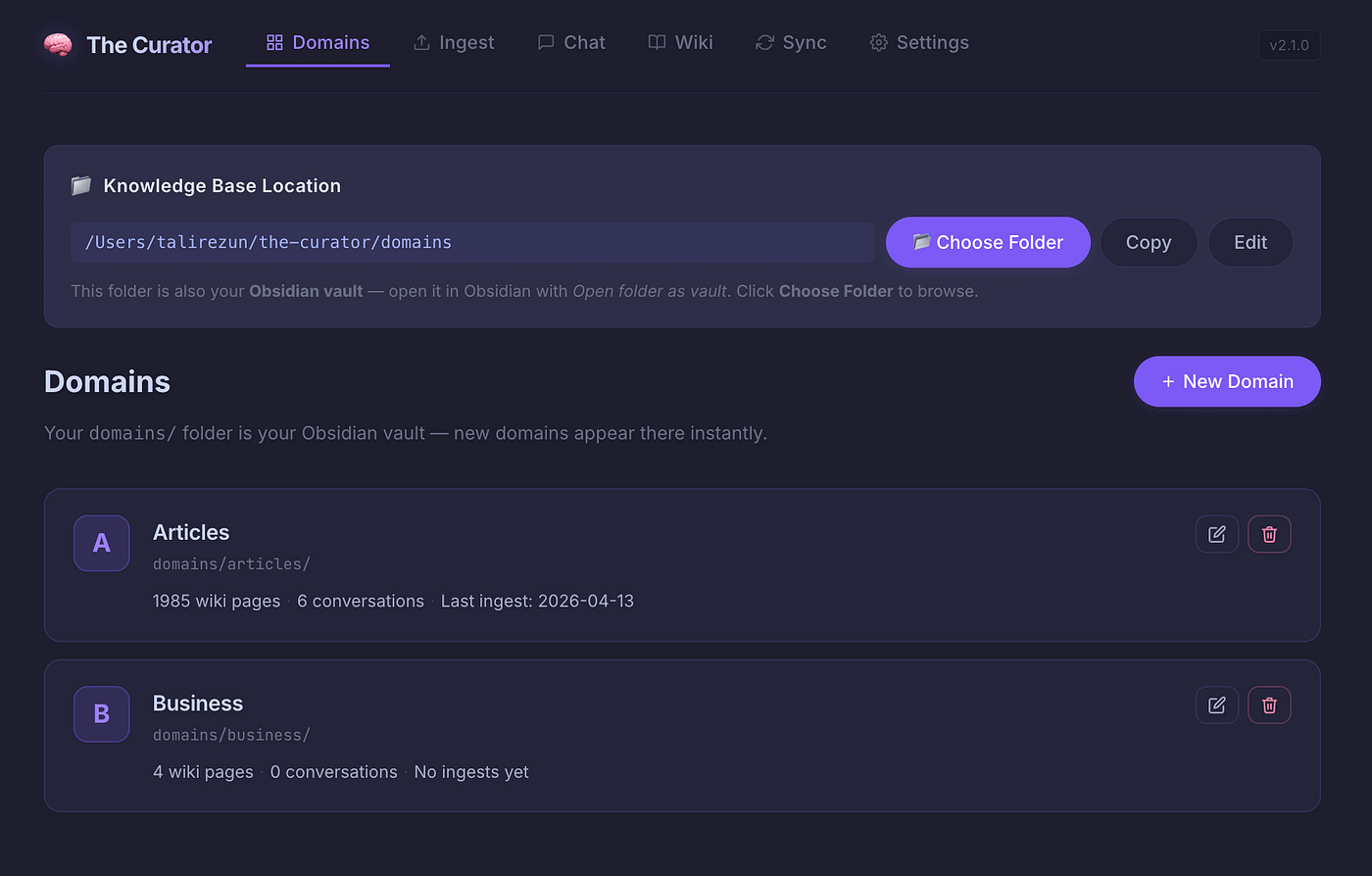
When you open The Curator, the first thing you encounter is the Domains section. Think of a domain as a knowledge territory — a focused area of your second brain dedicated to a specific subject.
You might have a domain called AI and Technology. Another for Business Strategy. One for Research. Perhaps a personal one for Life Thinking or Health. The structure is entirely yours to decide.
In Obsidian’s language, each domain corresponds to a folder within your vault. But in The Curator, you manage them through a simple interface — create, rename, and organise your knowledge territories without ever touching a file or writing a line of code.
This separation matters. Different domains compound independently. The connections within your AI domain are specific and deep. When you eventually want to explore connections across domains — ideas from technology that intersect with business strategy, for instance — the My Curator MCP (more on this shortly) makes that traversal possible.
Ingest: Where Raw Material Becomes Structured Knowledge
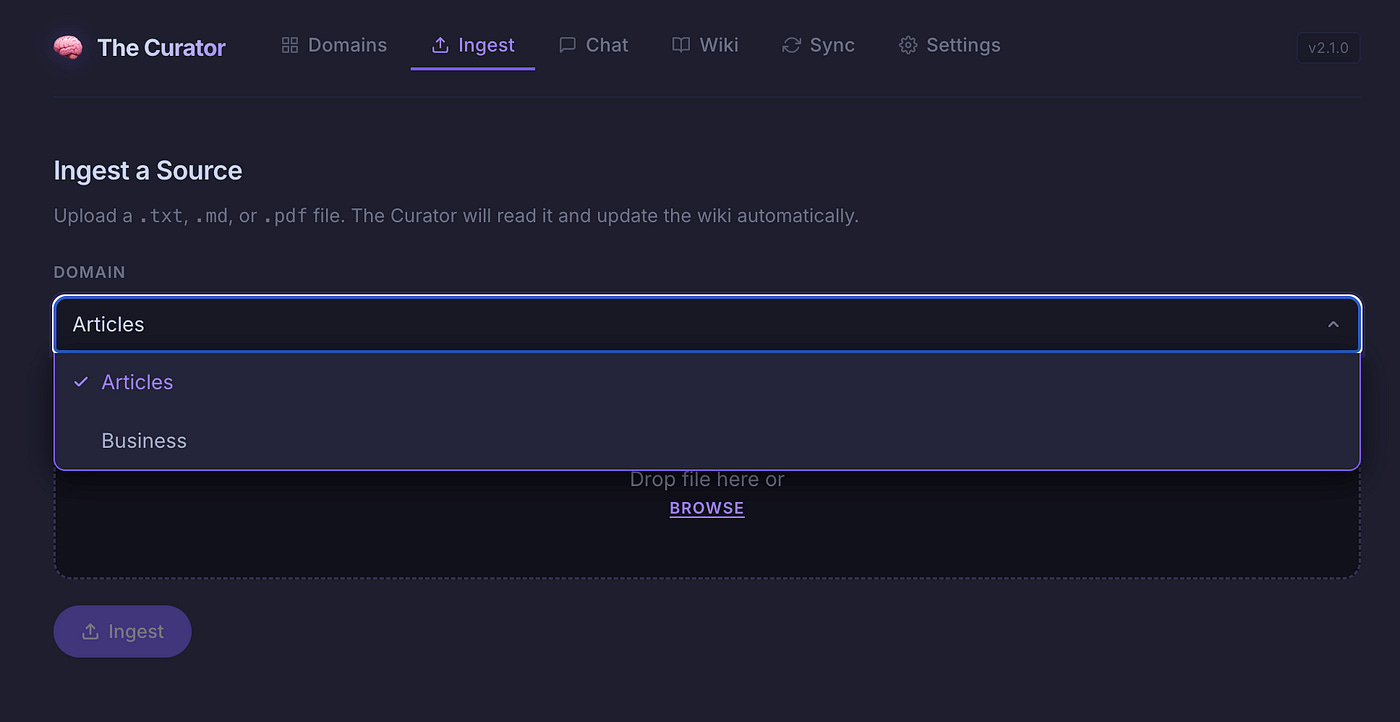
This is the engine room of the whole system — and the section I built first, because it solves the single biggest barrier to building a second brain in practice.
The problem is this: to populate a knowledge graph with the kind of interconnected, structured nodes that make it genuinely useful, someone has to do the work of decomposing each source into its constituent parts. Extract the key concepts. Identify the people, tools, and organisations involved. Write summary pages. Create the links. Update existing pages with new information. This work is precise, repetitive, and time-consuming. Humans abandon it almost universally.
In The Curator’s Ingest section, you drop in a PDF, a markdown file, or a plain text document. That is the entire manual effort required on your part.
Behind the scenes, the AI reads the document and performs what I call Atomic Decomposition — breaking it into three distinct types of knowledge nodes:
Entity pages — for every significant person, tool, company, or organisation mentioned. Each entity gets its own dedicated markdown file in your wiki, describing what it is and how it relates to everything else.
Concept pages — for every key idea, framework, methodology, or technique. These are the intellectual building blocks of your domain — the things that recur across sources, connect different perspectives, and form the backbone of your understanding.
Summary pages — one per source document, capturing the key takeaways, the connections to other nodes, and the context of why this source matters.
Every page is cross-linked. The summary links to its entities and concepts. The entity and concept pages are updated to reference the new summary. The result is that every new source you add weaves itself into the existing fabric of what you already know.
Now here is where the compounding becomes important — and I want to explain this precisely, because it is the core of why this approach is fundamentally different from simply saving documents.
The first time you ingest an article, the AI creates pages and establishes connections based on that article alone. The second time you ingest a related article, the existing entity and concept pages are updated — not duplicated. New facts are added. Contradictions are flagged. The connections grow denser in both directions. By the tenth article on a topic, the concept pages have become rich syntheses that no single source contained. By the hundredth, they reflect a genuine depth of understanding — a distillation of everything you have read, connected, and accumulated.
This is how human expertise works. This is how it can now be externalised.
The AI currently powering The Curator’s ingest function is either Google Gemini 2.5 Flash (recommended — it has a free tier and extremely low operational cost for paid usage) or Anthropic Claude Haiku. Both are capable, low-cost models well-suited to this kind of structured document processing.
Chat and Wiki Overview: Two Ways to Read What You Know
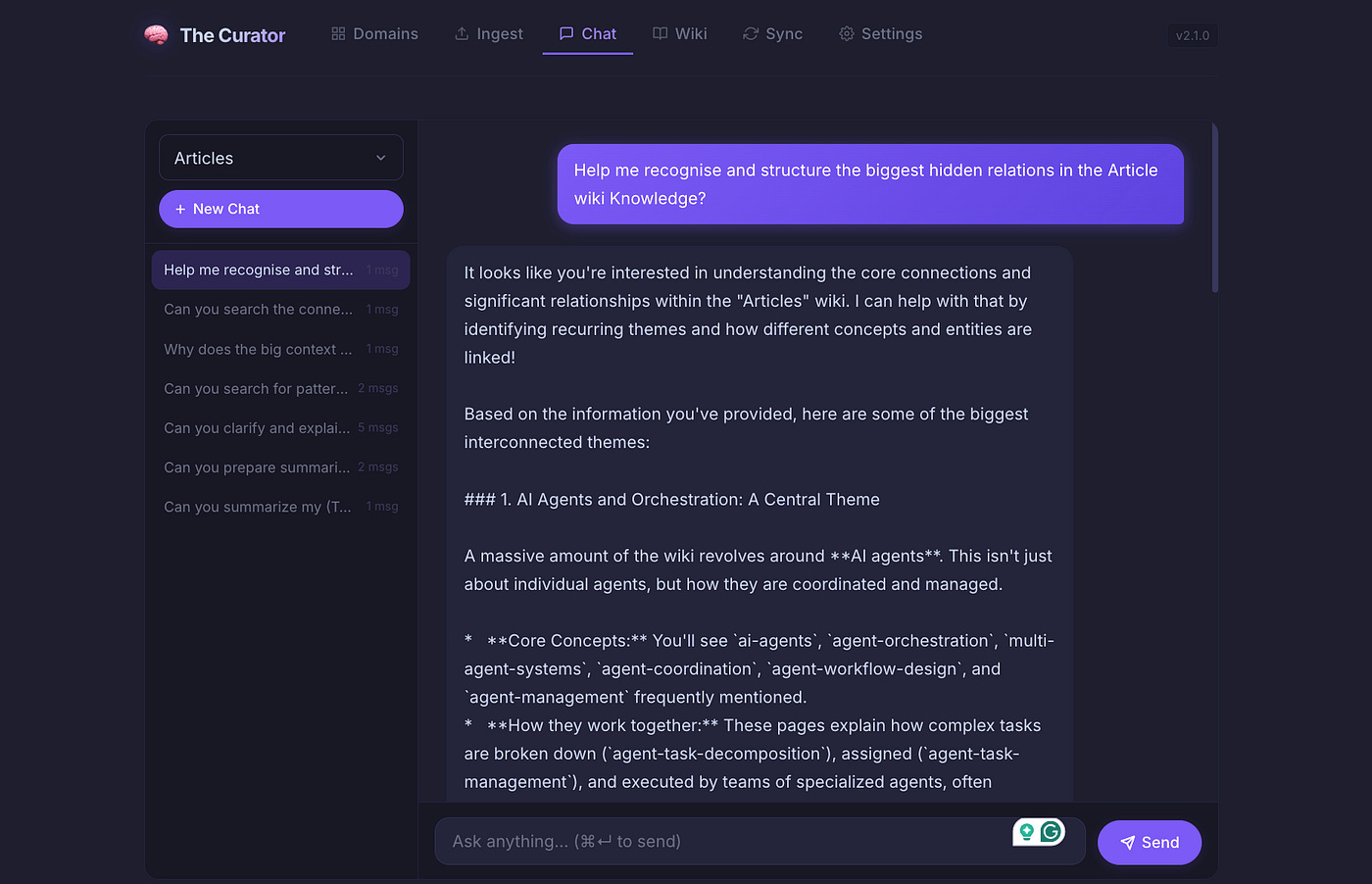
The Curator includes two built-in sections for exploring your second brain directly within the app.
The Wiki tab gives you a simple browser for reading your generated pages — useful for a quick check, a specific lookup, or a direct browse of a topic area without opening Obsidian.
The Chat tab lets you have a multi-turn AI conversation with your entire knowledge base. Ask a question, and the AI reasons across everything you have ingested — synthesising answers, making connections, citing the specific wiki pages it drew from. Ask follow-up questions. Explore a topic in depth. The AI maintains conversation history, so the dialogue builds rather than resetting.
This is already genuinely powerful. But it is worth being clear: the built-in Chat uses the same low-cost models that power the ingest process. It is excellent for quick queries, fast lookups, and everyday exploration. For something deeper — real research, cross-domain synthesis, the kind of thinking that requires a frontier model — there is another path.
My Curator MCP: Talking to Your Second Brain with a Frontier Model
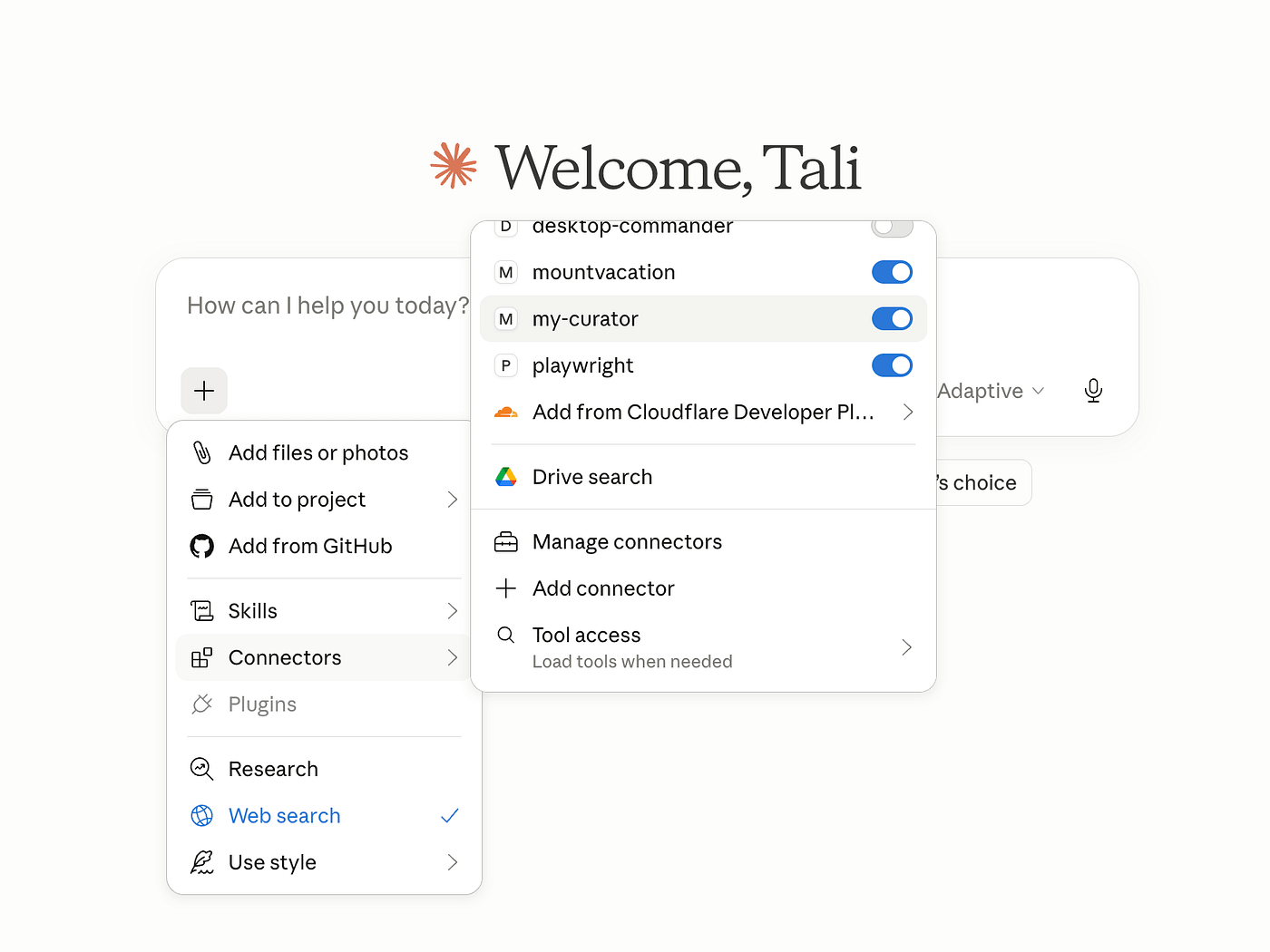
This is the part of the system I find most exciting, and the one that perhaps best illustrates the full potential of what a structured second brain makes possible.
MCP — Model Context Protocol — is a standard that allows AI applications to connect to external tools and knowledge sources. As of version 2.3, The Curator includes a component called My Curator, which is a personal MCP server that exposes your entire knowledge graph to any MCP-compatible AI application on your computer.
What this means in practice: you can install My Curator into Claude Desktop, into VS Code with a coding agent, into LM Studio with a local model, or into any application that supports MCP. And from that point forward, you can sit with one of the most capable AI models in the world — Claude Sonnet, Claude Opus, or your local model of choice — and have it explore and reason over your second brain as a first-class knowledge graph.
Not just reading your files. Traversing your graph. Following connections from node to node. Finding non-obvious links between ideas you ingested months apart. Identifying the most central hubs in your knowledge network — the concepts that everything else connects to. Running semantic searches across every domain simultaneously.
Imagine you have spent five years building a second brain. Thousands of nodes. Dozens of domains. Articles, research papers, books, personal notes — all ingested, all interconnected. You sit with Claude Opus and ask: “What are the most important ideas in my AI domain that I’ve never explicitly connected to my business strategy domain?”
The model traverses your graph. It finds the intersections. It surfaces connections you made unconsciously, over years, without ever noticing them.
This is what I mean when I say the second brain becomes more valuable the longer you maintain it. The graph reveals the shape of your thinking in ways that are invisible to you while you are inside it.
My Curator reads only your local wiki folder. Everything stays on your machine. No data is sent anywhere. The server is read-only — it cannot modify your wiki, only explore it.
Health: Maintaining the System Over Time
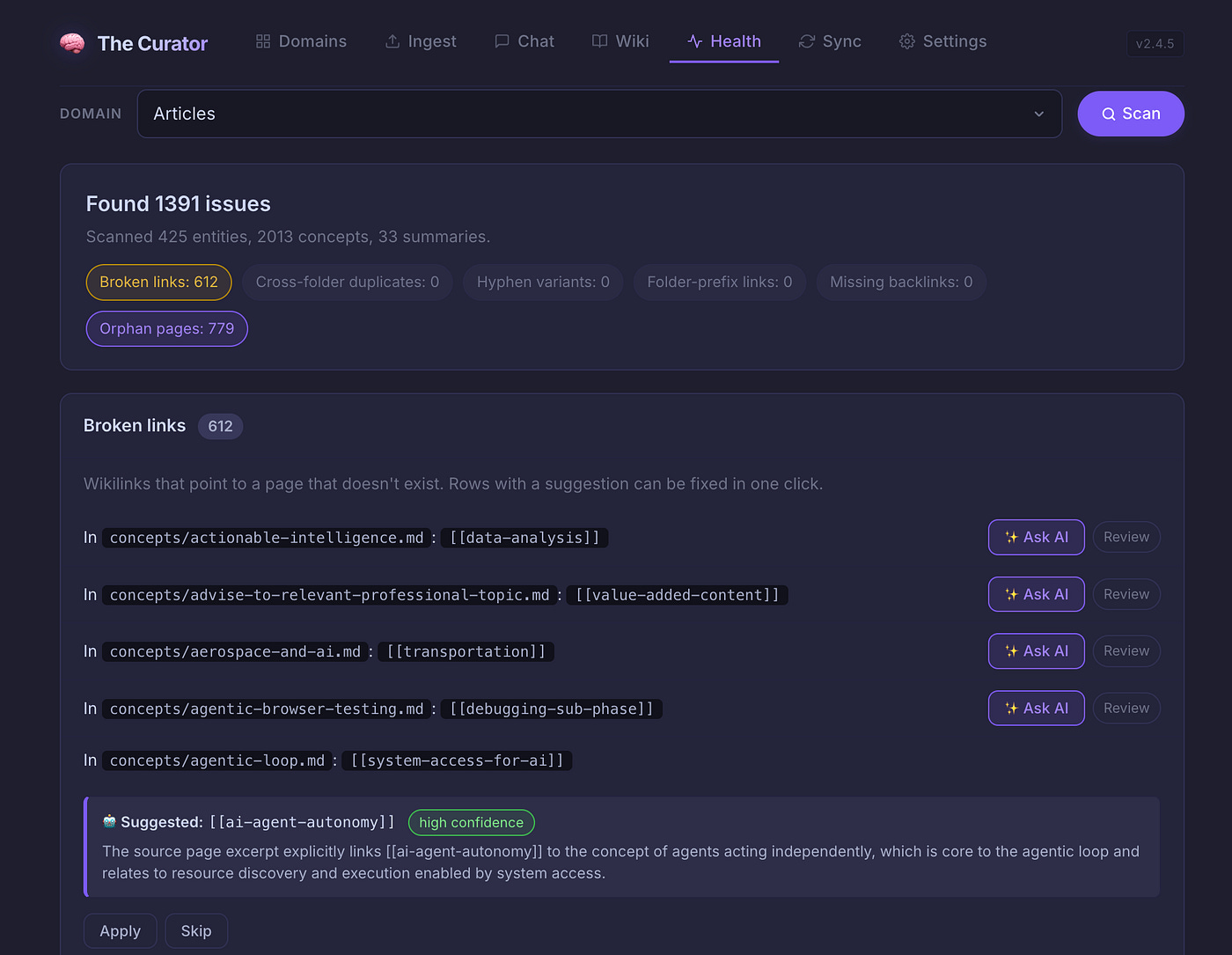
A knowledge graph built by AI is, as I like to say, approximately 95% right. The AI understands context extremely well — it makes connections, identifies relationships, and structures knowledge at a level that would take a human many times longer to produce manually.
But it is not perfect. Over time, as your second brain grows, small issues accumulate. Duplicate files where two entries describe the same entity under slightly different names. Broken internal links where a referenced page was never created or was renamed. Orphaned nodes — pages that exist but connect to nothing else in the graph.
The Health section of The Curator is a comprehensive system for detecting and repairing these issues. I believe it is the only tool of its kind available for maintaining a markdown-based knowledge wiki at this scale.
Through a simple UI, you can run a full health scan of any domain. The system identifies broken links and suggests the most likely correct targets — which you review and apply with a single click. It finds orphaned nodes and uses AI to propose which existing pages should link to them, with a written explanation of why. It detects semantic duplicates — pages that describe the same concept under different names — and proposes merges with a full preview before any change is made.
Everything is AI-assisted and human-reviewed. The system proposes; you decide. The result is a knowledge graph that stays coherent and connected as it grows, rather than degrading under its own weight.
Sync: Your Second Brain, Everywhere — and Shared
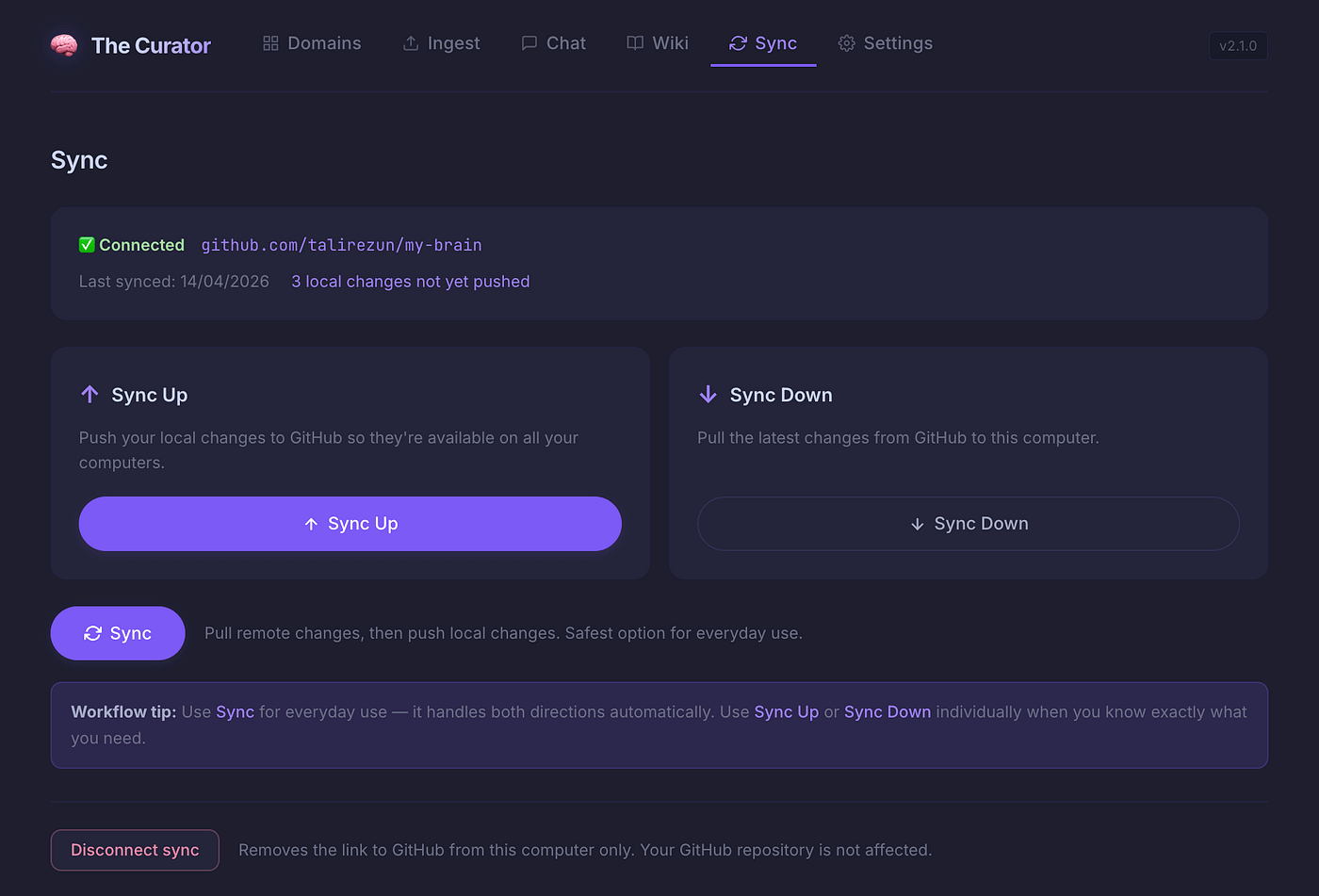
The Sync section solves a practical problem elegantly: how do you make your second brain available across multiple computers, and how do you share it with others if you choose to?
The mechanism is straightforward. You create a repository on GitHub — private, if you want your knowledge to remain entirely yours — and connect it to The Curator through a simple wizard. From that point forward, syncing your knowledge is a single click. Push your latest work when you finish. Pull updates when you switch to another machine.
The implications extend well beyond personal convenience.
An organisation can create a shared repository and give team members access to the same second brain. A founder’s accumulated strategic knowledge becomes queryable by the leadership team. A research group’s collective literature review lives as a single, growing, connected graph that every member can access, add to, and explore.
A teacher — and this is something I am exploring with my MBA students at COTRUGLI — can build a second brain around a curriculum, and students can access it directly, asking questions through their own MCP-enabled AI clients and receiving answers grounded in the course’s actual knowledge base rather than generic internet data.
This is the shared second brain concept. And I think it has implications we are only beginning to understand.
Settings and Updates: The Practical Foundation
The Settings section handles the practical infrastructure: API keys for the AI models that power ingest and chat, the MCP setup wizard for connecting My Curator to Claude Desktop or another application, and the update system.
The Curator is under active development. New features, fixes, and improvements ship regularly. The update process is a single button click — the app pulls the latest version, rebuilds, and restarts automatically. No terminal required.
The Compounding That Changes Everything
I want to return to something I mentioned earlier, because I think it is the most important idea in this entire article — and it is the one that most people miss when they first encounter the second brain concept.
Most tools treat your knowledge as a static archive. You add something, and it sits there. You can search it. You can read it. But it does not grow.
The second brain built with The Curator is not an archive. It is a living system. Every source you ingest does not just add pages — it updates and enriches every related page that already exists. The concept page for machine learning becomes more detailed. The entity page for a researcher you keep encountering grows richer. The connections between ideas become denser and more revealing.
After a few weeks of consistent use, the chat answers become more nuanced, because there is more to draw on.
After a few months, you have something genuinely rare: a personalised knowledge base that reflects your actual intellectual journey — your sources, your domains, your questions. No one else has this. It cannot be replicated by a search engine or a generic AI tool. It is yours.
After years? The second brain becomes something I can only describe as an intellectual autobiography. A record not just of what you learned, but of how your understanding evolved. Which ideas you kept returning to. Where your thinking contradicted itself and then resolved. A tool for serious long-term thinking that becomes more valuable with every passing year.
This is why I use the word immortality without embarrassment.
The great figures of history were remembered because their knowledge was recorded, structured, and made accessible to others. The medium was stone, papyrus, paper, printing press. The medium changes. The principle does not.
Today, the medium is markdown files. Simple, lightweight, open, durable — readable by humans and AI alike. And for the first time in history, the process of maintaining a structured, interlinked, growing knowledge base is not an enormous burden reserved for institutions with dedicated librarians and archivists. It is something one person can do, consistently, with minimal effort, using a tool that runs silently on their laptop.
Your knowledge does not have to die with you. Your expertise — the real texture of it, the connections, the frameworks, the hard-won understanding — can be externalised, maintained, and made available to the people who come after you.
That is worth taking seriously.
Getting Started
The Curator is open source and free to use. You can find it at github.com/talirezun/the-curator.
Installation is a single command — the app installs itself and opens in your browser automatically. A step-by-step onboarding wizard walks you through the setup. The default AI model, Google Gemini 2.5 Flash, has a free tier generous enough that most users will pay nothing at all for the processing.
You do not need to understand markdown or graph theory or the technical details of how any of this works under the hood. You need to have knowledge worth preserving — and the patience to let the system compound.
Start with what you already have. A few articles you have written. Research papers you have read. Notes from a project you completed last year. Drop them in. Watch the graph begin to form. And then keep going.
In a year, you will not recognise the richness of what you have built.
In a decade, you will be grateful you started today.
About the Author
Dr. Tali Režun is a Serial Entrepreneur, Business Developer, and Academic at the forefront of frontier technologies. As Vice Dean of Frontier Technologies at COTRUGLI Business School, he leads AI innovation initiatives and shapes MBA curricula for the next generation of technology leaders. With over 30 years of entrepreneurial experience — founding and scaling ventures including The Curator, Lumina AI, Moj AI, Block Labs, CR Systems, 4thTech, Immu3, PollinationX, and Online Guerrilla — he bridges cutting-edge research in AI and Web3 with practical business transformation.
Tali’s Links
—
https://talirezun.com/
— https://x.com/talirezun
— https://www.linkedin.com/in/talirezun
— https://www.researchgate.net/profile/Tali-Rezun
—
Disclaimer
Research and Educational Purpose
This article is published for research and educational purposes only. The content represents our personal experiences, observations, and analysis based on extensive hands-on experimentation with AI agent technologies over the past eighteen months.
No Commercial Relationships
We have not been compensated, sponsored, or otherwise financially supported by any of the companies, platforms, or tools mentioned in this article. All opinions, assessments, and recommendations are my own and based solely on independent research and practical experience.
Individual Research Required
Readers are strongly encouraged to:
Conduct their own independent research before adopting any AI agent technology
Evaluate tools and platforms based on their specific use cases, requirements, and risk tolerance
Test systems thoroughly in controlled environments before production deployment
Consult with relevant technical, legal, and security professionals when implementing AI agents in business-critical or sensitive applications
Stay informed about evolving best practices, security considerations, and regulatory requirements
No Guarantees or Warranties
While I have made every effort to ensure accuracy based on my research and experience, I make no guarantees regarding the performance, reliability, security, or suitability of any AI agent technology for any particular purpose. Technology capabilities and limitations may vary significantly based on implementation details, use cases, and environmental factors.
Evolving Landscape
The AI agent ecosystem is developing rapidly. Tools, platforms, protocols, and best practices referenced in this article may be superseded, deprecated, or fundamentally changed by the time you read this. Always verify current capabilities and recommendations with primary sources and official documentation.
Your Responsibility
You are solely responsible for evaluating whether and how to implement AI technologies in your specific context. Consider your risk tolerance, regulatory requirements, security needs, and organizational capabilities before implementation.
Was able to overcome the installation obstacles by asking help to Claude Cowork. The Curator now runs.
I started ingesting but run almost immediately into Gemini rate limits and the process got stopped.
I also got an error when trying to upload PDFs. I converted them to .md and that went through fine until the ingesting process got stopped.
Wonderful. Dr. Razun, I am definitely no authority to compliment you but as a long-time curation scholar I find your essay right on target (I was waiting for a non-technical implementation of Karpathy’s LLM-wiki) and your app very promising. I am actually trying to install it now.
Two questions:
1) Karpathy was also mentioning the ability for each new interaction you have with the knowledgebase to become new fresh input for your wiki. I did not see any mention of this in your essay.
2) I have followed the instruction to install on a Mac, - the simple straightforward one - but while the system message says that everything has been installed correctly, no app starts automatically and I have no idea on how to do so myself. Any suggestion, on what I am doing wrong will be precious.
Look forward to report on what I see and discover by using it.