
Three weeks ago, “loop engineering” became one of the hottest phrases on my feed. Matt Van Horn’s post “WTF Is a Loop? Part 2: The 15 Loops People Are Actually Running” accumulated 3.6 million views and launched dozens of follow-up threads about /loop commands, verifier patterns, and overnight code runners. According to Lev Deviatkin’s widely shared 14-step roadmap from prompter to loop designer, nine out of ten builders have never written a single loop that prompts the agent for them: no automation, no state file, no verifier, no schedule.
I read all of this with a mix of recognition and mild amusement.
Not because the ideas are wrong. They are not. I found myself nodding at Boris Cherny’s description of running Claude Code together with an advanced model and a verifier in a loop, feeding it tasks, and removing bottlenecks as you go. I recognized the pattern behind the self-verifying loop architecture demonstrated by 0xRicker, where 300 parallel agents run 4,000 steps across five live data feeds while a separate verify engine catches errors before anything ships. The vocabulary is precise and the tooling has matured considerably.
The reason I read it with recognition is simple. I have been building what I called “auto loops” for over a year.
How I Got Here: The Phase That Nobody Talks About
In my article Behind the Curtain: The Three-Phase Process I Use to Build Every AI-Coded Product, I described the methodology I use to build software with AI coding agents. Phase One is Research, Design & Foundations, where you build the documentation foundation the agent needs to do good work. Phase Two is the Build Phase, where the code gets written. Phase Three is Production and Deployment.
Most of the excitement in the AI development community orbits Phase One and Phase Two. Better context, faster shipping, smarter orchestration. What nobody talks about much is Phase Three.
Phase Three is where auto loops were born for me.
When you deploy a production application and it is live, the human-in-the-loop testing cycle becomes genuinely painful. You click through the UI, encounter something broken, describe it to your agent, wait for a fix, deploy again, click through again. For an application with any complexity, the scenarios multiply fast: a user flow, an admin panel, edge cases, form validations, API responses that only surface under specific conditions. The cognitive overhead of manually orchestrating this exchange between the running application and the agent is exhausting. It is also, almost certainly, where most non-developer founders quietly give up on AI-coded products.
I needed the agent to go autonomous. So I started building what I called auto loops.
The Tool That Made It Possible: Playwright MCP
The first thing I needed was a way for the agent to interact with the application directly, rather than relying on me to act as the eyes and hands inside the UI. That is where Playwright MCP came in.
Playwright is a browser automation framework, and by connecting it to my agent stack via the Model Context Protocol, I gave the agent the ability to navigate a running application, interact with UI elements, observe what it saw, and report back. For the first time, the agent was not waiting for me to describe what was broken. It could find out for itself.
But this required significant preparation. The agent needed comprehensive context before entering the loop: the application architecture, the full feature inventory, the specific scenarios to test, and precise criteria for what success looked like in each scenario. This is where my context engineering work fed directly into the loop design. A loop with vague instructions does not wander productively. A loop with rich, structured context covers ground.
Once that foundation was in place, I could instruct the agent to enter an autonomous cycle: act as a user would, walk through the specified scenarios, identify what was not working, diagnose the source of the problem, propose a fix, implement it, and verify the fix held before moving on.
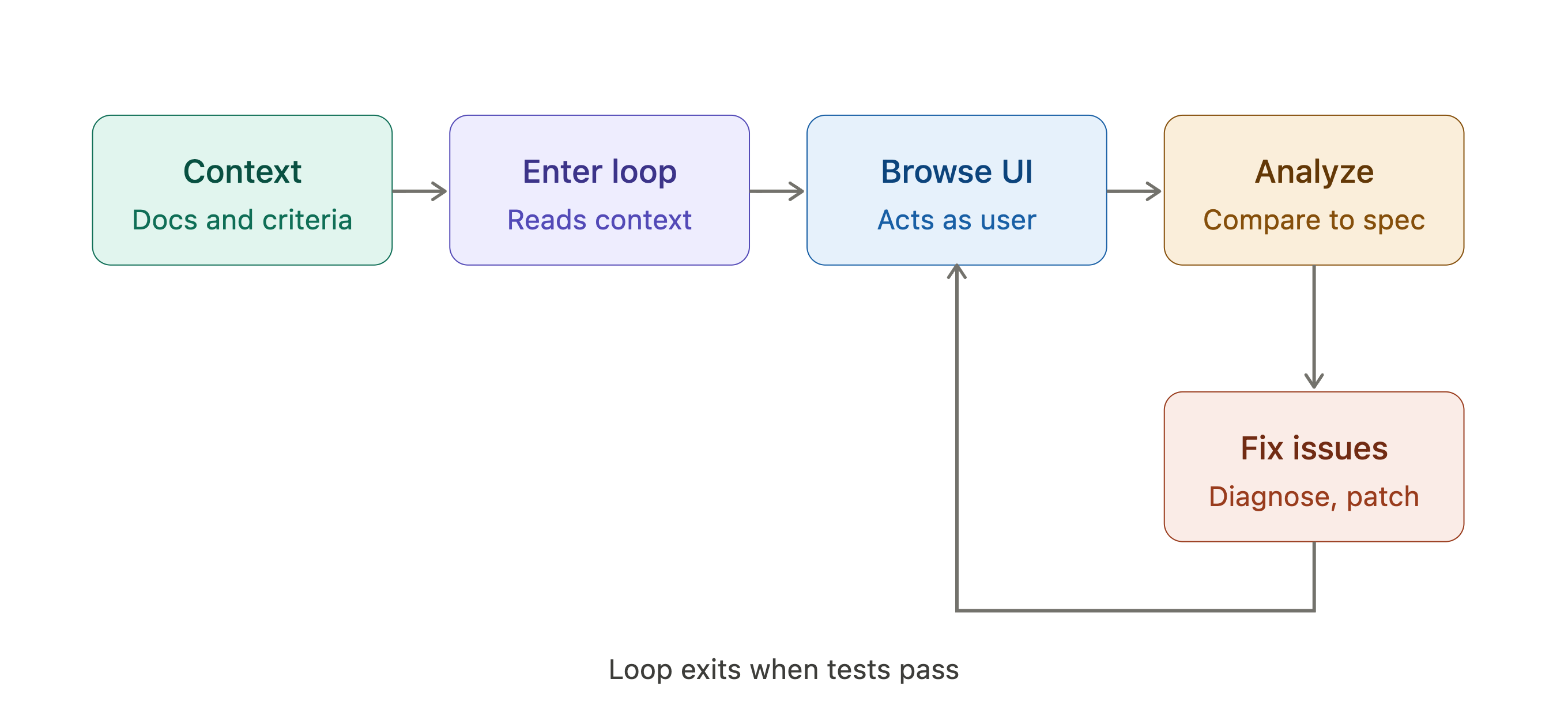
For applications with both a user-facing interface and an admin panel, I always ran these as separate loops. One loop simulating the user journey. A separate loop for the administrator. Mixing roles in a single loop created confusion that was harder to debug than the original problems.
Field Notes: The Moj AI Case Study
The most instructive example I can share is Moj AI, the application I built to help Slovenian people navigate the country’s complex building legislation. The knowledge base contains hundreds of regulatory documents, many running to 500 or more pages. The product takes a user’s question about construction permits, building codes, or related regulation, searches that library, and surfaces a precise, cited answer.
The pipeline making this work is not simple. It involves multiple agents, retrieval steps, reranking, and citation extraction. When something breaks in that pipeline, it often does not fail visibly. The application loads. The interface looks fine. A response appears. But the answer might be confidently wrong, or correctly directional but missing a critical regulatory nuance, or citing a document that does not actually support the claim.
The only way to know was to ask real questions and analyze the responses against source documents.
So I set up an auto loop. I prepared a set of representative user questions, questions I knew from experience were characteristic of what real users would actually ask. I instructed the agent to pose these questions as a user would, using Playwright to navigate the live application, wait for the full AI response, analyze whether it was accurate and well-cited, and trace any failures back through the pipeline to identify where the breakdown occurred.
When a response was wrong, the agent needed to understand why. Was it a retrieval failure? Had the relevant passage been missed in the search? Was it a synthesis error, where the language model processing the retrieved content drew the wrong conclusion? Once the root cause was identified, the agent proposed a targeted fix to the pipeline configuration, implemented it, and ran the same scenario again.
This is, in essence, exactly what the current loop engineering literature describes as a self-correcting goal-oriented loop. I just did not have the vocabulary for it yet.
The Honest Accounting: What the Viral Content Glosses Over
This is where most loop engineering content gets optimistic in ways that do not match my field experience.
It was slow. It was expensive on tokens. It frequently stopped before the job was done.
The cause of all three problems was the same: context window size. At the time, I was running this on Claude Opus models with a 200,000 token context window. Playwright-based agentic browsing is not lightweight. Every browser interaction, every screenshot analysis, every response evaluation consumes tokens at a rate that accumulates fast. A loop that walks through ten or fifteen scenarios, diagnoses failures, proposes fixes, and re-tests can saturate a 200k context window before it reaches the end of the task list.
When the context ran out, the loop stopped. Not with a graceful summary of what had been accomplished. It just stopped.
My adaptation was to move to a semi-automated rhythm. I would kick off the loop, let it run until it hit its limit, review the progress, manually continue from where it left off, and restart with fresh context. Not the seamless overnight automation the loop engineering community describes today, but a meaningful acceleration compared to purely manual testing.
Authentication was the other practical barrier worth naming. Most production applications require users to log in, and when the authentication mechanism involves OAuth providers, Google Sign-In in particular, the Playwright loop runs into genuine obstacles. The agent can authenticate, but in subsequent sessions it often loses that state and needs to log in again, which may trigger verification prompts or bot detection flows that break the automation entirely.
My practical solution was to run loops on application states that were already authenticated, or to test on local builds before authentication was wired in. Neither approach is elegant. If you are designing a loop-ready application, this is worth solving in Phase One, not discovering mid-loop in Phase Three.
What the Current Literature Gets Right
Reading through the recent loop engineering content, two ideas stand out as genuinely clarifying for practitioners.
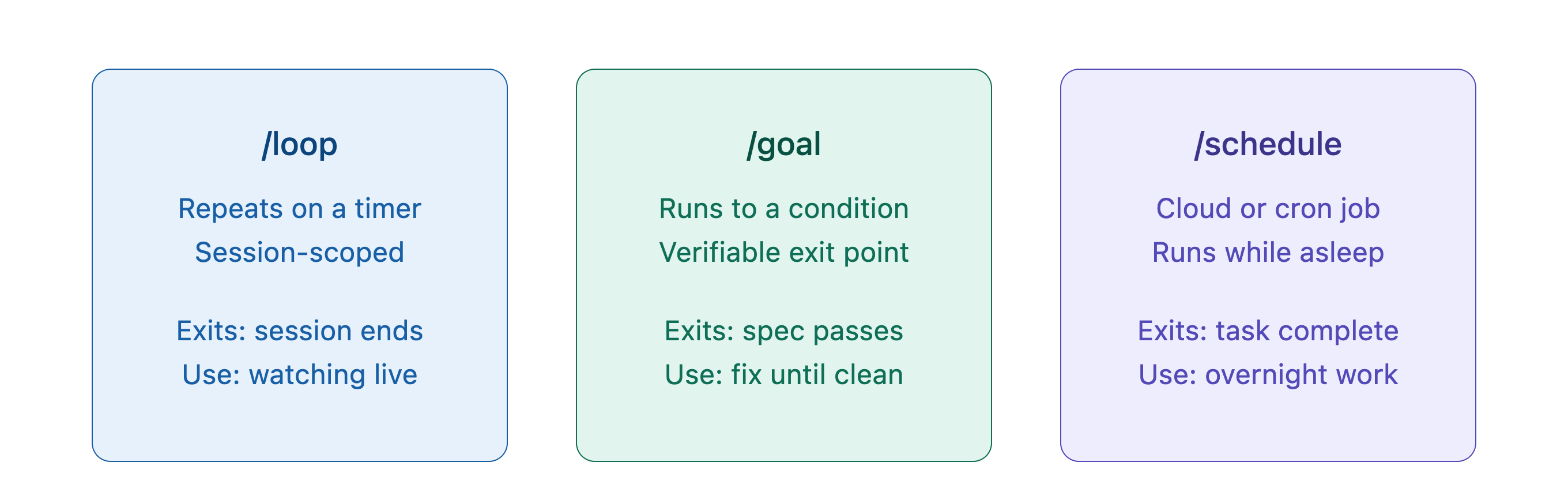
The first is the clean distinction between a loop, a goal, and a schedule. As pointed out by Matt Van Horn, these are meaningfully different operating modes. A loop repeats on a timer while your session is open. A goal runs until a verifiable condition is true and then stops. A schedule creates a cloud routine that runs while your laptop is closed. I was running something close to the goal model, but without these clean primitives I was conflating modes in ways that made the loops harder to reason about and harder to configure correctly.
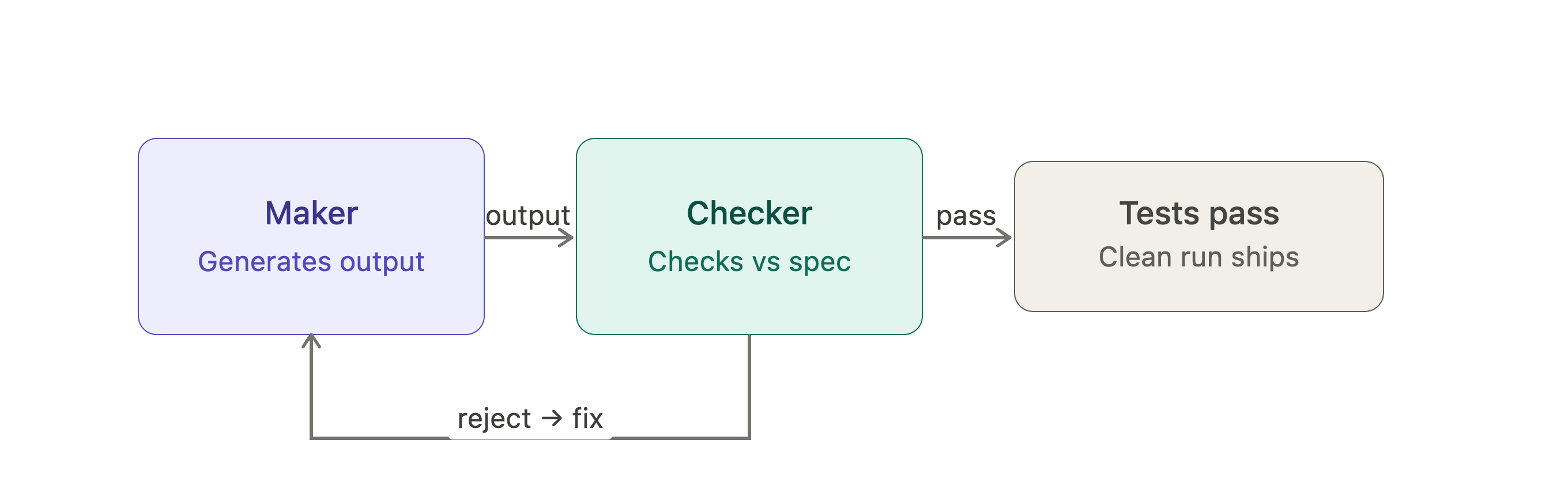
The second, and more important, is the verifier pattern. According to Boris Cherny, the critical element of a working loop is a separate verifier model that checks results against the spec and the tests, independent of the model that produced those results. The self-verifying loop architecture demonstrated by 0xRicker shows this at scale: Claude Opus 4.8 plans the work and verifies outputs while the Kimi K2.6 swarm executes, and results are only considered clean when a dedicated verify pass returns zero rejections across all 100 companies analyzed.
“A loop that cannot tell good output from bad does not save you work. It just produces wrong answers faster.” — @ahmetbilicanxyz
This is the piece I was missing in my auto loops. My loops had an implicit verifier in the form of my own review, but no explicit second model checking results against an objective standard. The agent that implemented the pipeline fix was also the one judging whether the fix had worked. An agent grading its own homework will find reasons to give itself a pass.
The Forward Future loop library on GitHub catalogues practical repeatable AI-agent workflows for engineering, evaluation, operations, content, and design. It includes a “quality streak loop” that does not declare victory after the first green run, but requires a consecutive streak of clean passes before stopping. That design philosophy — earned skepticism about a single success signal — matches my field experience exactly. One green run from a pipeline tested against its own training scenarios is not the same as ten consecutive clean runs across varied, representative user questions.
Where This Is Heading
Both the economics and the capabilities are shifting in ways that make robust auto loops increasingly practical.
Context windows are the most obvious change. With Claude Opus 4.8 running a 1 million token context window, the constraint that stopped my Moj AI pipeline loops mid-task becomes far less binding. The same loops that stalled out at the 200k ceiling can now run much further before hitting a limit. If I were building Moj AI today, the pipeline tuning loops I ran in fragments could likely run to completion in a single session.
Agentic browsing is also improving, though it remains far from fully solved. Better models and more mature tooling around browser automation mean the Playwright MCP loops I was running on older infrastructure are faster, more reliable, and more cost-efficient on current models.
The shift I consider most significant, though, is architectural rather than technical. As pointed out by Lev Deviatkin’s 14-step roadmap, the leverage point has moved from writing better prompts to designing better systems. For the past two years, the core skill in AI-assisted development was context engineering: giving the agent what it needed to do good work in a single session. That remains essential. But the next layer is loop engineering: designing the scaffolding that decides what the agent works on, with what verification gate, on what schedule, recording what state survives between runs.
According to the roadmap, only 1 in 10 builders has written a single loop that prompts the agent for them. That gap will close quickly. The developers who have already worked through the failure modes of context exhaustion, authentication barriers, and agents that grade their own homework will be several steps ahead when the rest of the community catches up.
Practical Advice from the Field
Start in your deployment and debugging cycle. This is where the pain of manual testing is most immediate, and where the case for automation is most clear. Your first loop should be built around a specific set of user scenarios, not around abstract code quality metrics.
Give the agent everything it needs before the loop starts. For Playwright-based loops, especially, context preparation is not optional. The architecture, the feature inventory, the specific flows to test, the success criteria for each flow: all of it needs to be in place before the loop runs. A loop with vague instructions wanders in circles. A loop with precise context makes measurable progress.
Add a real verifier, not a second opinion. A verifier checks a specific measurable condition. A reviewer has an opinion. You want a verifier: a second model, different instructions, no exposure to the reasoning that produced the output being checked. The maker and the checker should not share context.
Budget for tokens before you start. Playwright loops consume context aggressively. Set an iteration cap before you walk away. The overnight code runner that generates a surprise invoice was run by someone who did not set a ceiling first.
Solve authentication in Phase One. If your application has a login flow that will complicate Playwright automation, decide how to handle it during the architecture and context engineering phase, not during a loop that is supposed to be running without you.
The Loop Already Existed
The vocabulary is new. The concept is not.
For over a year, I have been running autonomous AI cycles through production applications, testing pipelines, diagnosing failures, and iterating toward clean results. I called them auto loops. The community now calls it loop engineering. The underlying pattern — detect, decide, act, verify, repeat — has not changed.
What the current moment offers that I did not have is better primitives, better tooling, and a more deliberate conceptual framework for designing these systems. The verifier pattern, the state file discipline, the clean separation of loop from goal from schedule: all of these make it easier to build loops that work reliably rather than loops that work until they fall over.
Build the loop. Give it a real verifier. Start in the part of your build cycle where you feel the most pain. That is where the leverage is.
The developer who designs the loop that prompts the agent is already ahead of the developer who is still doing the prompting themselves.
Dr. Tali Režun is Vice Dean of Frontier Technologies at COTRUGLI Business School and founder of The Curator, The 00T, Lumina AI, Moj AI, 4thTech, PollinationX and Block Labs Luxembourg. This article is part of the From Lab to Life series: field notes from real builds, not vendor marketing.