
Current version: v3.0.1-beta.23
Repository: github.com/talirezun/the-curator
Status: Active · MIT License · 27 ⭐ — if you find this useful, a star helps others discover it.
What Is The Curator?
The Curator is a local, AI-powered knowledge curation system — open source, fully private, and built around a simple but powerful idea: your knowledge should compound, not get lost.
You feed it documents — PDFs, articles, notes, Substack posts, research papers. The Curator reads them and automatically writes 5–15 interlinked wiki pages per source: structured summaries, entity pages (people, tools, companies), and concept pages (ideas, frameworks, techniques). Every page cross-references related pages. Every future ingest updates existing knowledge rather than creating duplicates. The graph compounds.
Built on the Karpathy llm-wiki concept, it flips the standard RAG model on its head:
RAG (the old model): scan raw files → retrieve chunks → forget everything when the chat ends. Starts from zero on every question. Nothing compounds.
The Curator (the new model): read source → write persistent wiki pages → update existing pages on every ingest → cross-references baked in, contradictions flagged. Knowledge is compiled once and kept current.
Everything is stored as plain markdown files on your own computer. No subscriptions. No database. No cloud accounts beyond a Google Gemini or Anthropic Claude API key (Gemini has a free tier; moderate solo use runs roughly €5/month).
Who Uses It and How
The Curator is designed for people who accumulate knowledge for a living — researchers, founders, academics, executives, MBA students — and are tired of watching that knowledge evaporate.
Core workflows:
Research synthesis. Drop in papers, articles, or documents across a domain. The Curator builds and maintains a living knowledge graph — contradictions flagged, concepts cross-linked, nothing filed and forgotten.
Second brain for writing. Ingest your own published articles, newsletters, or talks. Then chat with your full body of work before writing something new. The Curator surfaces connections you’d forgotten.
Collective knowledge (Shared Brain, v3.0.0+). Cohorts, teams, or research groups can contribute to a collective wiki. Each member keeps their private Curator; only opted-in domains push synthesised Delta summaries to a shared repository. The collective wiki pulls back as a read-only mirror domain — everyone’s reading compounds together.
AI-assisted wiki maintenance. The Health tab scans for broken links, orphan pages, duplicate concepts, and missing backlinks. The System Check panel confirms the app itself is configured correctly. One-click fixes for everything it can resolve automatically.
MCP integration (My Curator MCP). A standalone MCP server exposes your local wiki to any MCP-compatible AI client — Claude Desktop, LM Studio, and others. The Curator app doesn’t even need to be running. This is the bridge between a private knowledge graph and frontier AI.
This Update in One Sentence
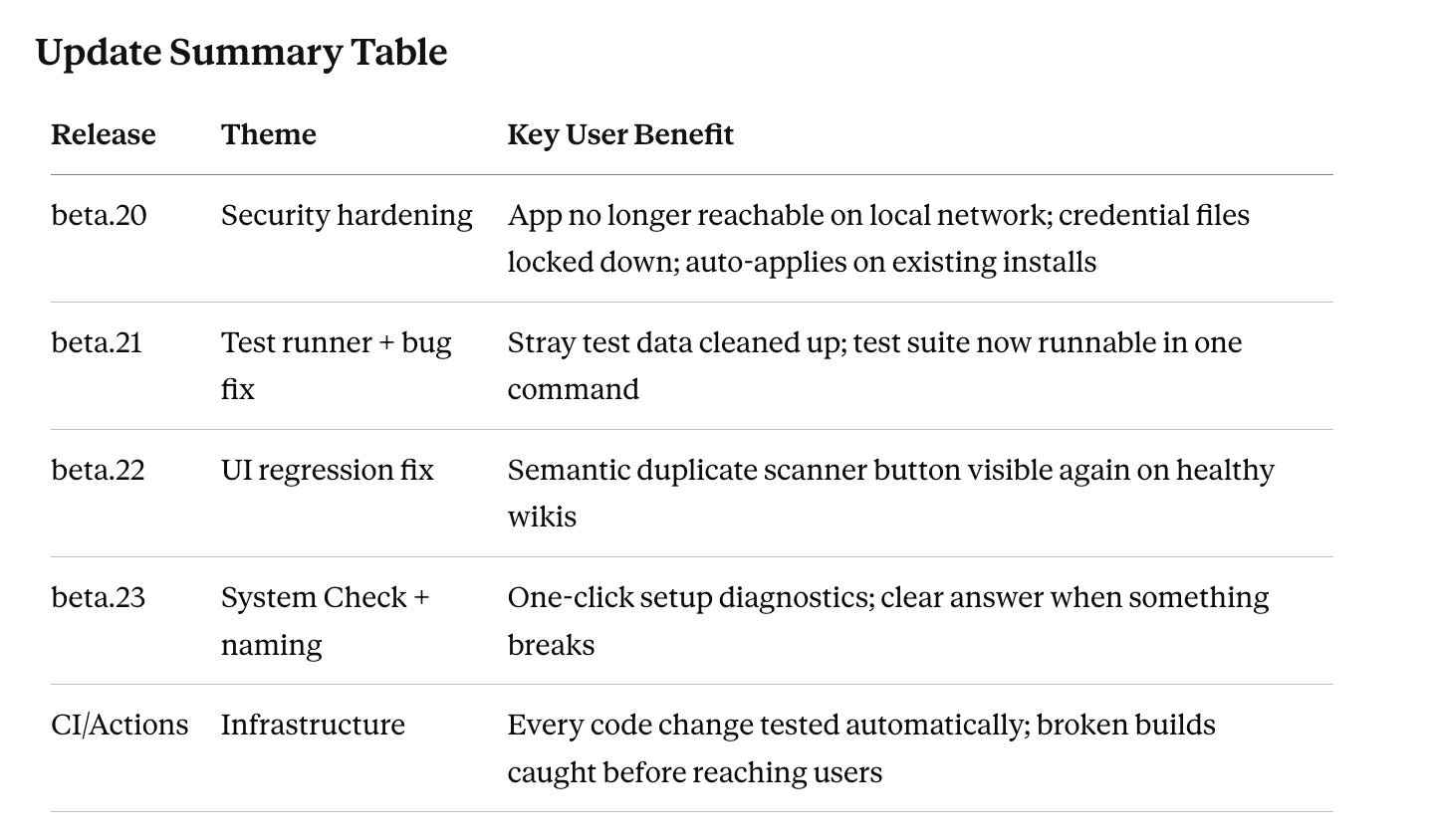
Four releases and a full CI/test-automation system — hardening security, fixing real community-reported bugs, adding a useful new diagnostics feature, and building the infrastructure that catches broken changes before they reach users.
Release Log
v3.0.1-beta.20 — Security & Hygiene Hardening
What changed for users: The app can no longer be reached by other devices on your Wi-Fi or local network, and your API keys and credentials are now protected at the file-permission level. Confusing or outdated UI text was also cleaned up.
Background: A community member commissioned a security audit using GLM-5.2, a recently released Chinese open-source coding model. The audit surfaced approximately 30 findings. Every claim was verified against the actual codebase — many were outdated or inaccurate — and only the genuine, low-risk subset was implemented.
What was changed technically:
Loopback-only binding. The server now binds to
127.0.0.1instead of0.0.0.0. Previously, any device on the same local network or Wi-Fi could theoretically reach the app. Now it only listens for connections from your own machine.Cross-origin guard. State-changing requests (POST, PUT, DELETE, PATCH) carrying a foreign
Originheader are now rejected. This defends against a malicious website attempting to call the app silently through your browser (a “DNS-rebinding” class of attack).Credential file permissions hardened to
0600. The files that hold your API keys and sync tokens —.curator-config.json,.sync-config.json,.sharedbrain-config.json,.env, and the PAT-bearing.knowledge-git/config— now have owner-only read/write permissions. A startup sweep automatically hardens these on existing installs, so no manual action is needed.Stale UI text removed. Dead references to old button names (”Sync Up / Sync Down”) were removed. The GitHub auth-error message now gives correct advice for both fine-grained and classic personal access tokens.
User impact: Negligible change in day-to-day experience. The app works exactly the same — it just does so more securely. Existing installs are automatically upgraded at next launch.
v3.0.1-beta.21 — One-Command Test Runner (+ Hidden Bugs It Exposed)
What changed for users: Primarily infrastructure — but the act of building a proper test runner immediately surfaced a real bug: on machines with a fully configured Curator, several internal tests had been silently writing test data into actual user knowledge folders. This is fixed.
Background: The security audit noted there was no easy way to run the existing (large) test suite. Building a proper runner immediately found that the tests themselves were broken on real installs.
What was changed technically:
npm testnow runs 16 offline suites in roughly 1.3 seconds — free, no network, no API calls, with credentials stripped as a safety measure.npm run test:liveadds the paid API suites.Root-cause bug fix. The domains-folder resolver was preferring the saved production config over the test override, so tests that tried to redirect to a throwaway folder were silently writing into the real
domains/folder. A proper test seam (__setDomainsDirOverride, inactive in production) was added, four affected suites were fixed, and stray test data was cleaned up.CONTRIBUTING.mdadded — covering developer setup, testing workflow, and the release process. This lowers the barrier for community contributions.
User impact: No change to normal use. Stray test data that may have been written into your domains folder on previous versions has been cleaned up.
v3.0.1-beta.22 — “Find Duplicate Pages” Reachable Again
What changed for users: The semantic-duplicate scanner — which finds wiki pages describing the same concept under different slugs (e.g. [[rag]] and [[retrieval-augmented-generation]]) — was effectively invisible on structurally clean wikis. The button to launch it has been restored to always appear when the scan is available.
Background: A community member reported the feature had disappeared. Investigation confirmed the underlying engine was working perfectly — the problem was purely the button’s visibility, a regression introduced during a UI redesign in beta.17. Verified live on both Gemini and Anthropic.
What was changed technically:
The “✨ Find duplicate pages” button lives in the Health tab’s Quick-maintenance bar. That bar previously only rendered when structural issues were present. Since semantic duplicates are a separate scan type and don’t count toward structural issue counts, on a clean wiki the bar — and therefore the button — never appeared.
Fixed: the bar now renders whenever any maintenance action is available, regardless of structural health status.
User impact: If your wiki is structurally clean (no broken links, orphans, etc.), you can now access the semantic duplicate scanner again. The scan itself was never broken — only the route to it was.
v3.0.1-beta.23 — System Check Panel + Naming Cleanup
What changed for users: A new System Check panel in Settings gives you a one-click confirmation that your app is set up correctly. It checks: API key configured, knowledge folder writable, credential files locked down, sync status. There is also an optional tiny AI connectivity test (~$0.0001) that confirms in one click whether a failure is your key or your provider having a bad day. Separately, confusing overlapping “health” naming across three parts of the UI has been resolved.
Background: The diagnostics work had a user-facing half that was missing — users had no easy way to self-diagnose setup problems. Separately, a user flagged that “Health tab,” “AI Wiki Health,” and a new “Health Check” panel sitting near each other was genuinely confusing.
What was changed technically:
New Settings → System Check panel. Free local checks run instantly, touching no wiki content. The folder check uses a self-deleting temporary file. Fully provider-agnostic — verified live on both Gemini and Anthropic. The optional “Verify AI connection” test makes one minimal API request and costs approximately $0.0001.
Naming scheme resolved:
“AI Wiki Health” (scan limits section in Settings) → “Wiki Health — Scan Limits”
New panel → “System Check” (deliberately avoids “Health” to prevent overlap)
The Health tab itself is unchanged
Rule baked into copy: System Check = “is the app working?” · Health tab = “is my wiki clean?”
Grammar fix: “Sync your The Curator” → “Sync your knowledge”
User impact: The next time something seems wrong — a failed ingest, a sync error, uncertainty about your API key — you go to Settings → System Check first. One click gives you a clear answer. No more guessing whether the problem is configuration, credentials, or a provider outage.
Test Automation & CI (GitHub Actions)
This is infrastructure, not a user-facing version — but it directly protects users.
What it means in plain terms: Every time code is pushed to The Curator’s repository, GitHub automatically runs the full test suite on a clean machine and shows a green ✓ or red ✗. Because the app auto-updates from the repository, this catches a broken change before it reaches users. The expensive AI-calling tests run only on official maintainer releases, using encrypted API keys stored in GitHub — the open-source community cannot accidentally run up costs on the maintainer’s account.
How it’s structured:
Offline job: runs on every push and every pull request, including community forks. Free, no secrets, no API calls.
Live job: runs only on push-to-main or manual trigger. Gated so fork pull requests never reach the secrets (GitHub also withholds secrets from fork PRs by default — defense in depth). Uses both Gemini and Anthropic keys.
What was fixed to make this work:
The paid API suites had the same data-pollution bug from beta.21 and referenced two files that existed only on the maintainer’s machine.
Fixed with a cross-process test override (
CURATOR_TEST_DOMAINS_DIR), split into CI-safe and local-only suites, tiered timeouts, one suite repointed to a committed source file, and a personal-data-dependent suite moved to local-only.Result: both jobs green end-to-end, zero pollution of real user data.
A CI status badge is now visible in the README — the green ✓ you see on the repository is live confirmation that the version you are about to install has passed the full test suite on a clean machine.
Documentation Updates
Substantial documentation work accompanied these releases:
New:
docs/system-check.md— full documentation for the System Check featureNew:
CONTRIBUTING.md— developer setup, testing, release process, CI guideRenamed:
health-check.md→system-check.md(matching the final naming)Updated: README (Features, Security section, docs tables, CI badge),
docs/README.md,docs/user-guide.md,docs/api-reference.md,docs/ai-health.md,docs/architecture.md, Shared Brain docs (version stamps made version-agnostic), andCLAUDE.md(release entries, design decisions, directory map)Freshness sweep: corrected stale security claims, outdated semantic-scan launch instructions, and version stamps throughout
Bonus Context: Gemini 503 Errors
If you encounter ingest failures with Gemini, the most likely cause is intermittent HTTP 503s from Google-side congestion on the gemini-2.5-flash-lite model specifically — not a Curator bug and not a problem with your API key. Google’s status dashboard may show all-green because it does not track per-model load on the free API tier.
Workaround: wait a few minutes and retry, or switch to gemini-2.5-flash in your settings. If the error persists beyond 10–15 minutes, then check your API key in System Check.
How to Get These Updates
If you are already running The Curator, open the app → Settings → check for updates. The app pulls the latest version, rebuilds the Dock app, and restarts automatically.
If you are new: one-command installation on macOS via install.sh. Windows and Linux: manual setup covered in the README.
Repository: github.com/talirezun/the-curator
If The Curator is useful to you — a ⭐ on GitHub is the best way to help others find it. Stars are how open-source projects surface in discovery and how maintainers know the work matters.
Document prepared: June 2026 · Version context: v3.0.1-beta.23