
The Problem Nobody Talks About
We live in the most information-rich era in human history. And yet, most of us are intellectually poorer for it.
Every day, we read articles, watch talks, annotate papers, sit through meetings, and scroll through a thousand small ideas that feel important in the moment. And then — almost all of it disappears. Not because we are not smart enough. But because the brain was never designed to be a filing cabinet. It was designed to think. To connect. To create.
The real tragedy is not that we forget. It is that the connections between what we know — the invisible threads between a biology paper and a business strategy, between a historical event and a technology trend — those connections almost never form. Not because they do not exist. But because our knowledge is scattered across browser tabs, PDF folders, highlight apps, and fading memories.
For years, I felt this acutely. As an entrepreneur, an academic, a person who reads constantly and builds companies and teaches MBA students about frontier technologies — I was drowning in information but starving for synthesis. I needed a second brain. Not a metaphor. An actual, structured, living system that would grow smarter the more I fed it.
What I eventually built — and what I want to share with you — is called The Curator. But the story of how it came to be starts with someone else’s idea. And it starts with a concept so elegantly simple that I had to sit with it for a while before I understood just how powerful it really was.
A Spark from Andrej Karpathy
If you follow the world of artificial intelligence, you know Andrej Karpathy. Former director of AI at Tesla, one of the founding members of OpenAI, one of the clearest and most generous explainers of deep learning on the internet. He is the kind of person whose ideas tend to be simple, precise, and quietly profound.
A while back, Karpathy shared a small document on GitHub — almost a thought experiment more than a finished product. He called it the LLM Wiki pattern. The idea was this: instead of using AI to search through your documents every time you have a question, use AI to continuously build and maintain a personal knowledge wiki. A structured, interlinked collection of markdown files that sits between you and your raw sources.
The distinction sounds small. It is not.
In Karpathy’s vision, every time you add a new source — an article, a paper, a transcript — the AI does not just index it for retrieval. It reads it, understands it, extracts the key information, and integrates it into the existing wiki. It updates pages. It adds cross-references. It flags where new information contradicts something you already knew. The knowledge is compiled once and kept current. It compounds.
“The tedious part of maintaining a knowledge base is not the reading or the thinking — it’s the bookkeeping.” — Andrej Karpathy
Karpathy described using Obsidian — a free, local-first note-taking application — as the interface for browsing this wiki in real time, while an LLM agent wrote and maintained the files. “Obsidian is the IDE,” he wrote. “The LLM is the programmer. The wiki is the codebase.”
When I read that, something clicked. The architecture was beautiful. The philosophy was correct. But the implementation — using an LLM agent in a terminal, managing files manually — required a level of technical comfort that most people simply do not have. And even for someone technical, the friction of doing this at scale, across dozens of domains and hundreds of documents, was enormous.
That gap is where The Curator was born. The core idea belongs to Andrej Karpathy, and I am genuinely grateful for it. What I built was a way to make that idea accessible, automated, and scalable — for anyone.
Why a Second Brain Is Not Like AI Search
Before we go further, I want to clear up a common misconception — because it is fundamental to understanding why this matters.
Most people’s experience of using AI with their documents looks like this: you upload a collection of files, you ask a question, and the AI searches through your documents to generate an answer. This approach is called Retrieval-Augmented Generation, or RAG. It is how NotebookLM works. It is how most “chat with your documents” tools work.
RAG is useful. But it has a deep structural flaw: it discovers knowledge from scratch every single time you ask a question. Nothing builds up. Ask a subtle question that requires synthesising five documents from different time periods, and the AI has to find and piece together the relevant fragments on the fly — often losing the nuance, the context, and the hidden connections along the way.
The reason is technical but important to understand. In RAG systems, your documents get broken into small chunks and converted into numerical vectors — mathematical representations of meaning. When you ask a question, the system retrieves the chunks whose vectors are closest to your query. Fast, yes. But the chunking process is mechanical. It does not know which ideas connect across different documents. It does not know that the study you read six months ago is quietly relevant to the paper you ingested yesterday. Small connections get lost. The graph of your knowledge never forms.
The Second Brain approach works entirely differently. There is no vectorisation. There are no chunks. The knowledge lives as plain text — in markdown files, organised by meaning, cross-referenced by hand of an AI that has already done the thinking for you. Every file is a node. Every link between files is a connection. And every time you add something new, the network does not just grow — it deepens.
RAG retrieves. The Second Brain remembers — and compounds.
The Architecture of a Second Brain: Entities, Concepts, and Summaries
The beauty of this system lies in its simplicity. Every piece of knowledge that enters your Second Brain gets decomposed into three types of files — what I call Atomic Decomposition.
Entities
Entities are the nouns. Specific people, companies, tools, datasets, institutions — anything with a proper name. Tali Režun is an Entity. Google DeepMind is an Entity. GPT is an Entity. Each Entity gets its own dedicated page that accumulates facts, context, and connections over time.
Concepts
Concepts are the ideas. Techniques, frameworks, principles, theories — ideas that do not belong to a single person or source. “Transformer architecture” is a Concept. “Compounding knowledge” is a Concept. “Retrieval-Augmented Generation” is a Concept. Concepts are the connective tissue of your intellectual world.
Summaries
Summaries are the narratives. Each source you ingest — each article, paper, or document — gets a Summary page that distils its key takeaways and ties together the Entities and Concepts it introduced or mentioned.
Every page in your Second Brain links to other pages using Obsidian’s wiki-link syntax — [[like-this]]. An Entity page for a researcher links to the Concept pages for the ideas they developed, and to the Summary pages for every paper of theirs you have read. A Concept page links to every Entity involved in its development and every Source where it appears.
The result is not a flat collection of notes. It is a living neural network of your knowledge — where every new piece of information you add strengthens existing connections and creates new ones.
Enter Obsidian: The Brain’s Visual Interface
This is where Obsidian comes in — and it is genuinely one of the most underappreciated tools available today.
Obsidian is a free, desktop note-taking application that works entirely with plain markdown files stored on your computer. Nothing goes to a cloud. No subscription. No server. Everything is local, private, and entirely under your control.
The way Obsidian is organised mirrors the Second Brain architecture exactly. Your vault is the master folder — think of it as the root directory of your entire knowledge base. Inside the vault, you organise your knowledge into domains, which are subfolders, each dedicated to a specific area of focus. A domain might be “AI and Technology.” Another might be “Business and Finance.” Another might be “Personal Growth.” If all your domains live within the same vault, all of your knowledge is searchable and connectable — one unified brain, not a collection of silos.
Within each domain, The Curator creates a clean structure: a wiki folder where all the generated markdown pages live, a raw folder where your original uploaded files are stored locally, and a conversations folder where your saved chat threads are kept. Every page the AI generates goes directly into these folders — and Obsidian reads them instantly.
But the feature that makes Obsidian truly remarkable — the one that turns a collection of markdown files into something almost alive — is the Graph View.
The Graph: Where Knowledge Becomes Visible
Open the Graph View in Obsidian and you are looking at your knowledge as a constellation. Every file is a node. Every [[link]] between files is an edge. The more connections a node has, the larger it grows. The more you feed the system, the more the graph expands — a beautiful, zoomable map of everything you know and how it all connects.
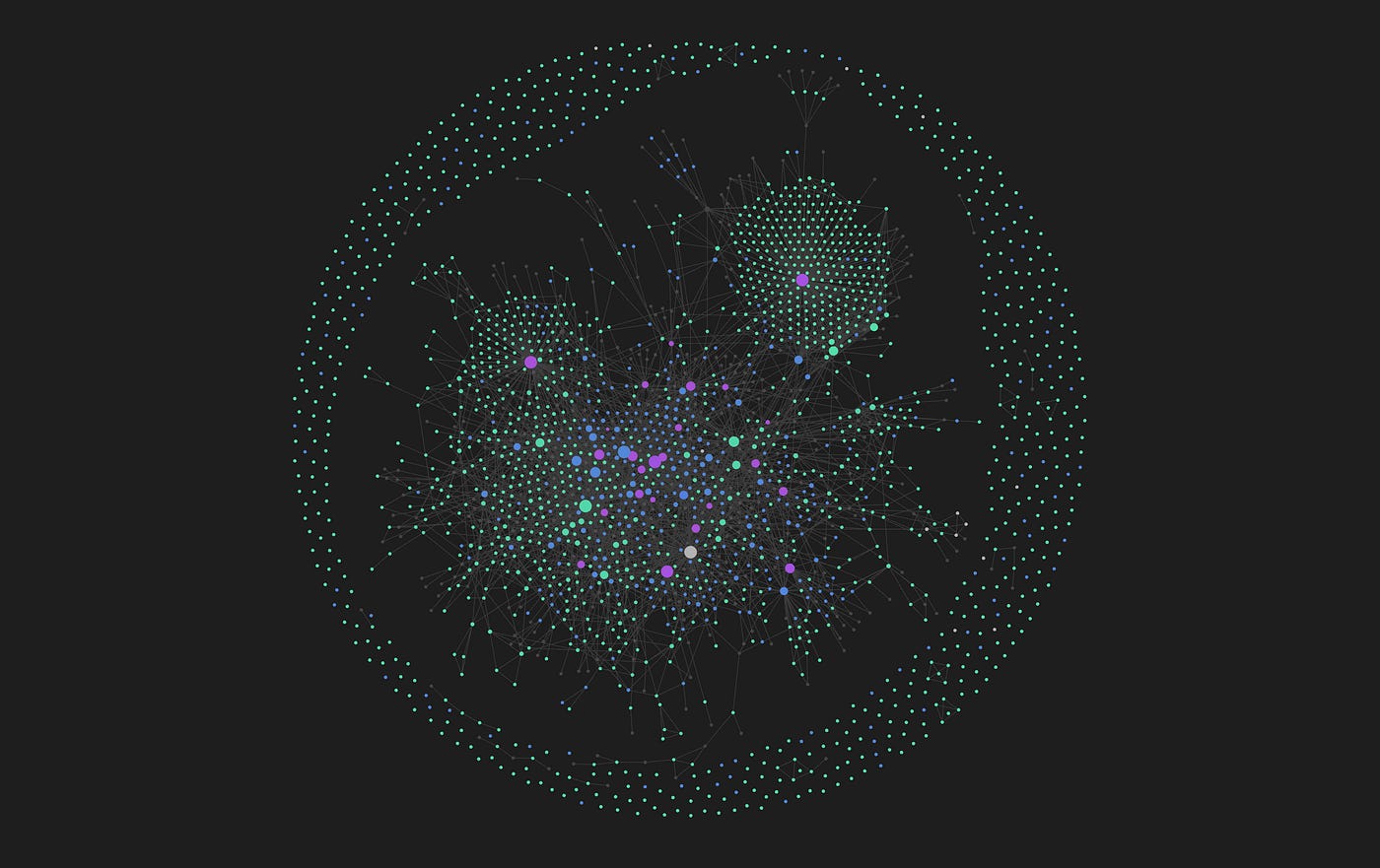
I have configured my own graph with a specific colour scheme that I want to share, because it transforms the experience entirely. I use navy blue for Entities, green for Concepts, and purple for Summaries. The moment you apply these colours, the graph stops looking like a technical diagram and starts looking like a living ecosystem. Navy clusters of people and tools orbit green clouds of ideas, stitched together by purple summary nodes that tell the story of how they met.
As I add new content to my Second Brain, I watch this graph grow in real time. Thousands of connections, branching and clustering in patterns I never consciously designed. I can zoom in to find a specific researcher and trace every idea she has influenced. I can zoom out and see which Concept nodes have grown the largest — those are the gravitational centres of my intellectual world, the ideas I keep returning to across dozens of sources.
There is something profound about this. For years, I had read voraciously but felt the knowledge was somehow inert — captured, but not alive. The graph makes the connections visible. It shows you patterns in your own thinking that you were not aware of. It reveals the hidden architecture of your curiosity.
This is what search bars can never show you. A search returns what you asked for. The graph shows you what you did not know to ask.
The graph does not just store your knowledge. It reveals the shape of your mind.
The Curator: Bridging the Gap
Here is the challenge that motivated me to build The Curator: the Second Brain idea, done manually, is an enormous undertaking. If you were to read a paper, write an Entity page for every person and institution mentioned, create Concept pages for every idea introduced, write a Summary, and then manually add cross-references to every related page — you might spend more time on the filing than on the reading. At scale, it becomes a project that takes years.
The Curator eliminates that burden entirely. It is a locally-running application — designed to live on your computer, not in someone else’s cloud — that uses AI to perform all of that decomposition and cross-referencing automatically. You drop in a file. The AI reads it, extracts the knowledge, writes the pages, updates existing pages with new information, and adds the links. You focus on reading, thinking, and asking good questions. The Curator does everything else, and it does it at scale.
How It Works: One Command, Then a Wizard
Getting started requires nothing more than copying a single installer command from the GitHub page and pasting it into your terminal. The app installs itself, builds a Mac Dock icon, and opens in your browser automatically. A friendly onboarding wizard walks you through three setup steps.
First, you set your domains folder — either pointing to an existing Obsidian vault or choosing any folder on your hard drive. Second, you provide an API key for the AI engine. The default is Google Gemini 2.5 Flash Lite, which has a generous free tier and extremely low cost for paid usage — making this system essentially free to run for most people. Anthropic’s Claude API is also supported, and local LLM support is in development. Third, if you want to sync your knowledge base across multiple computers, you connect a private GitHub repository.
That is the entire setup. From there, the app is organised into six clear sections.
The Six Sections of The Curator
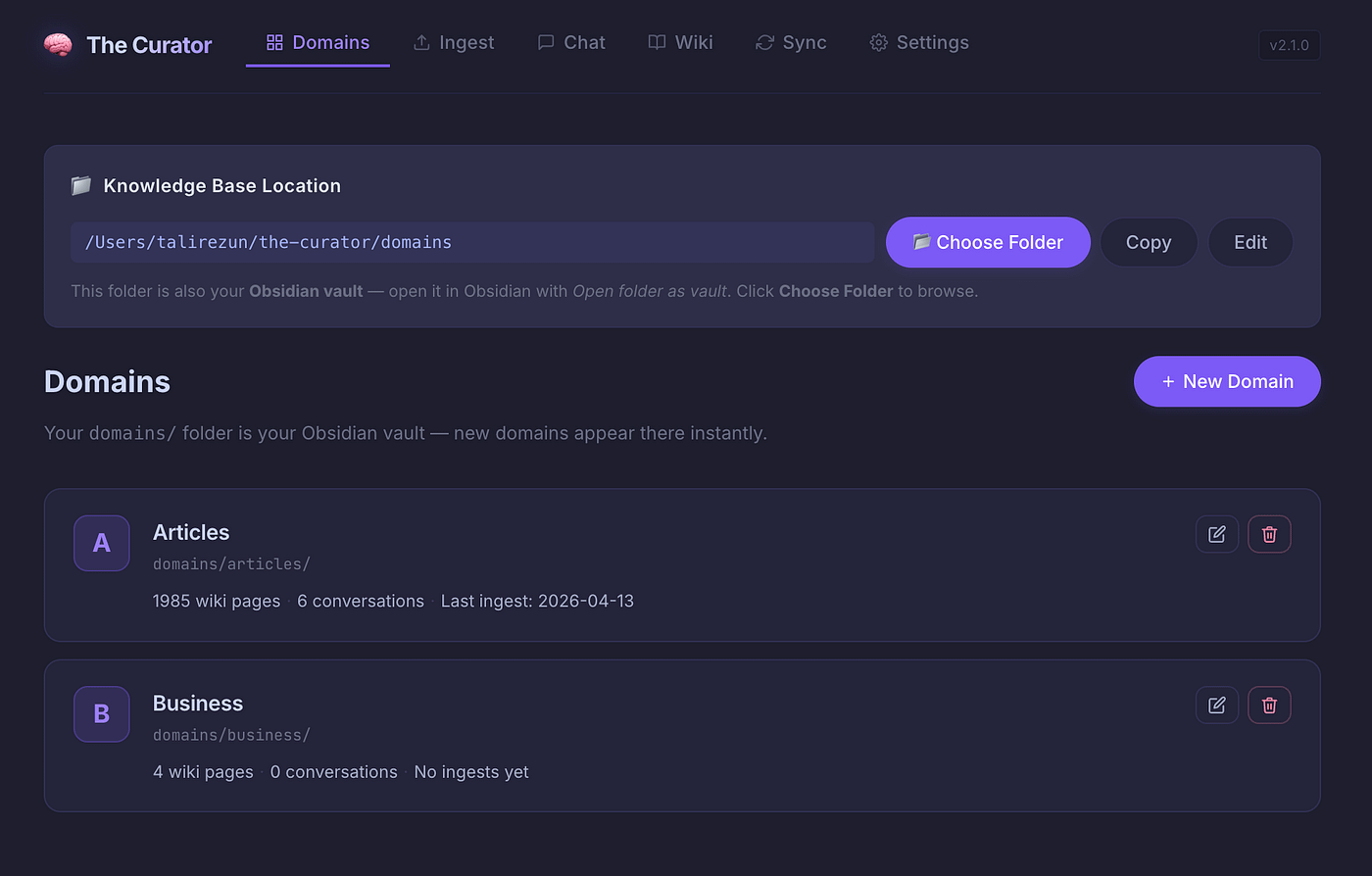
The Domains section is where you manage your knowledge domains — creating, naming, and organising the topic areas of your Second Brain. Each domain can hold a specific focus: AI and Technology, Business Strategy, Medical Research, Personal Journal — anything you want.
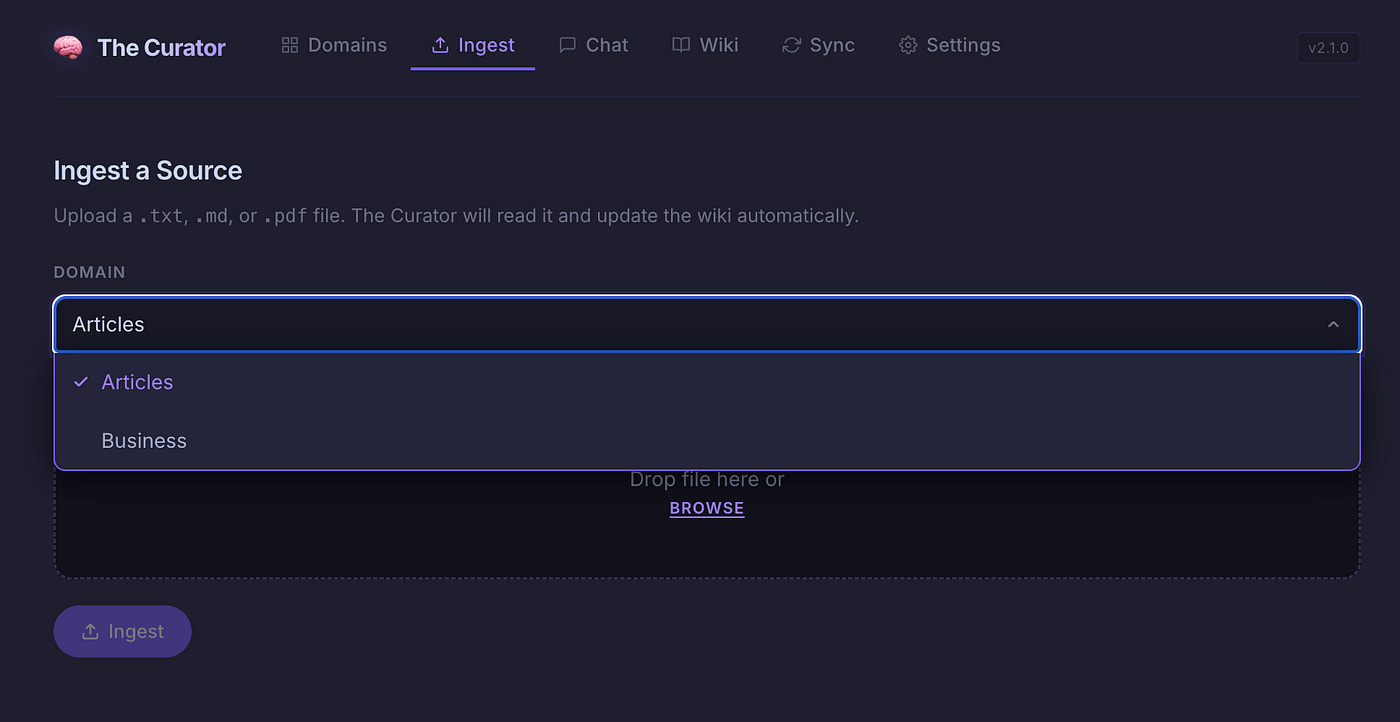
The Ingest section is the engine room. Drop in a PDF, a plain text file, or a markdown file, and the AI reads it, decomposes it into Entity, Concept, and Summary pages, updates any existing relevant pages with new information, and writes everything directly to your vault. The knowledge graph in Obsidian updates in real time.
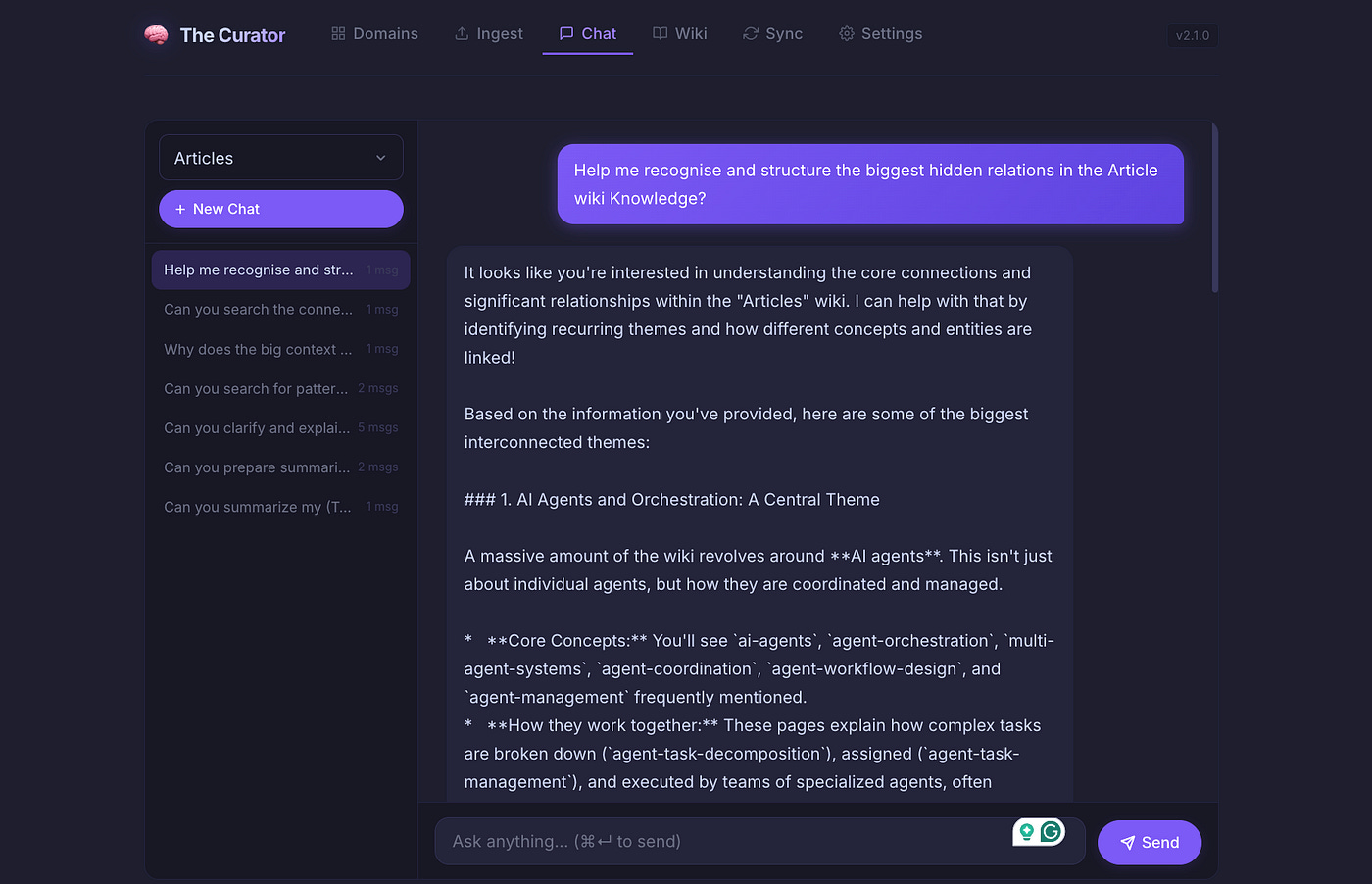
The Chat section lets you have multi-turn AI conversations with your entire Second Brain. Ask it to synthesise across sources. Look for patterns. Query it on specific topics. Every answer is grounded in your own knowledge and cites the exact wiki pages it drew from.
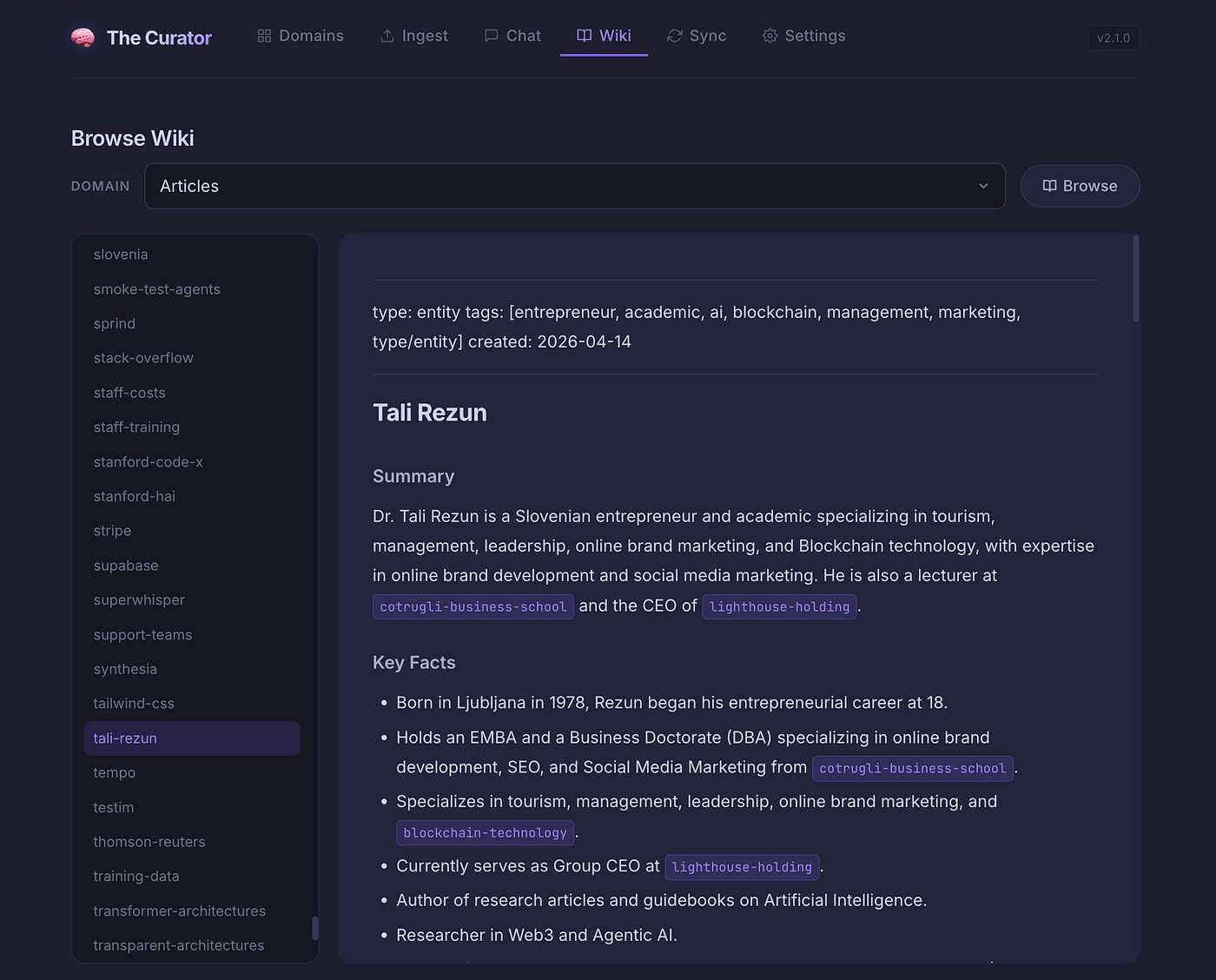
The Wiki section gives you a simple browser for reading your generated pages directly within the app — useful for a quick check without opening Obsidian.
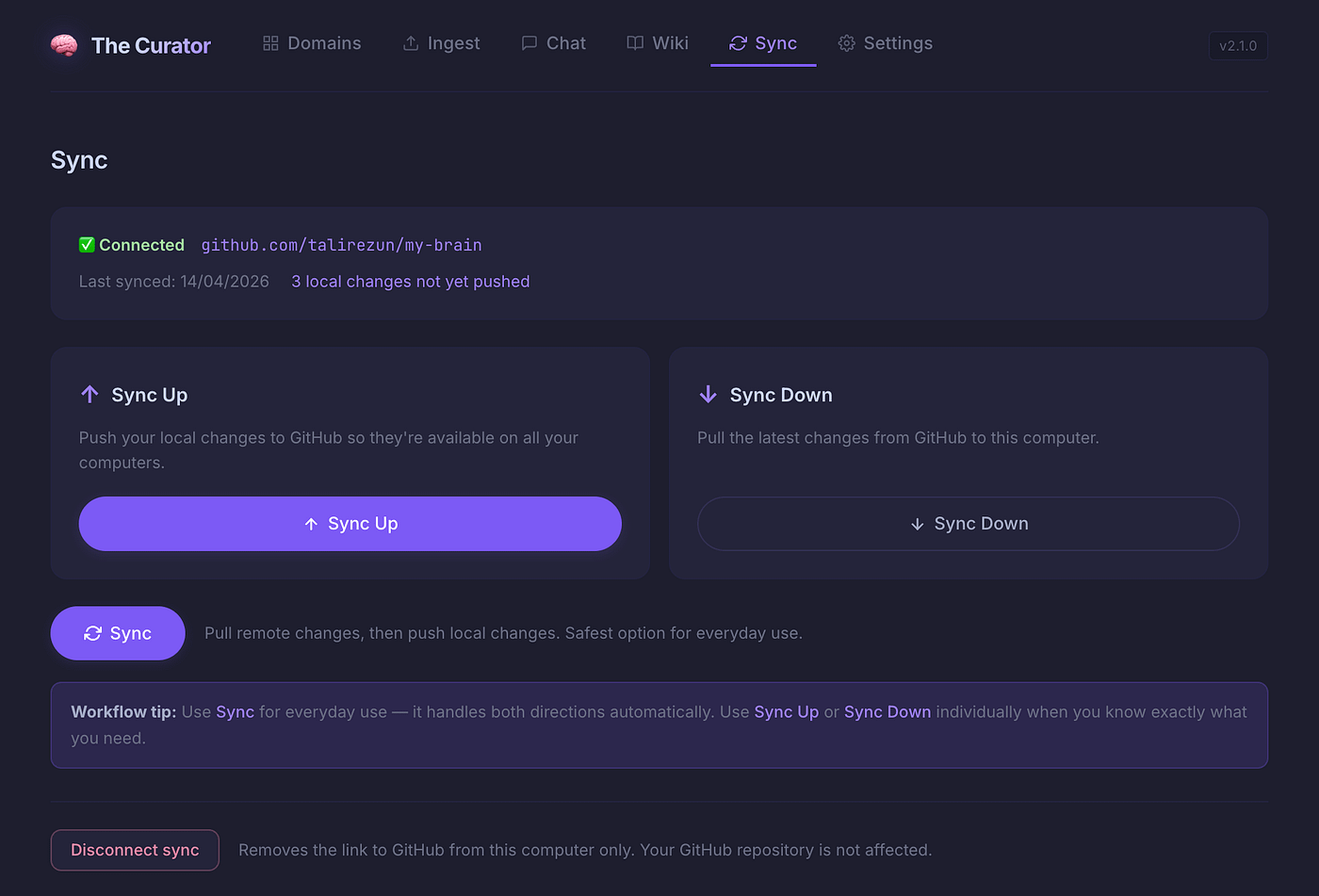
The Sync section manages the GitHub-based synchronisation system. Whether you are pushing your knowledge to a private repository or pulling updates on a different computer, the process is a single click. The recommended general sync option pulls remote changes first, then pushes local ones — the safest choice for everyday use across multiple machines.
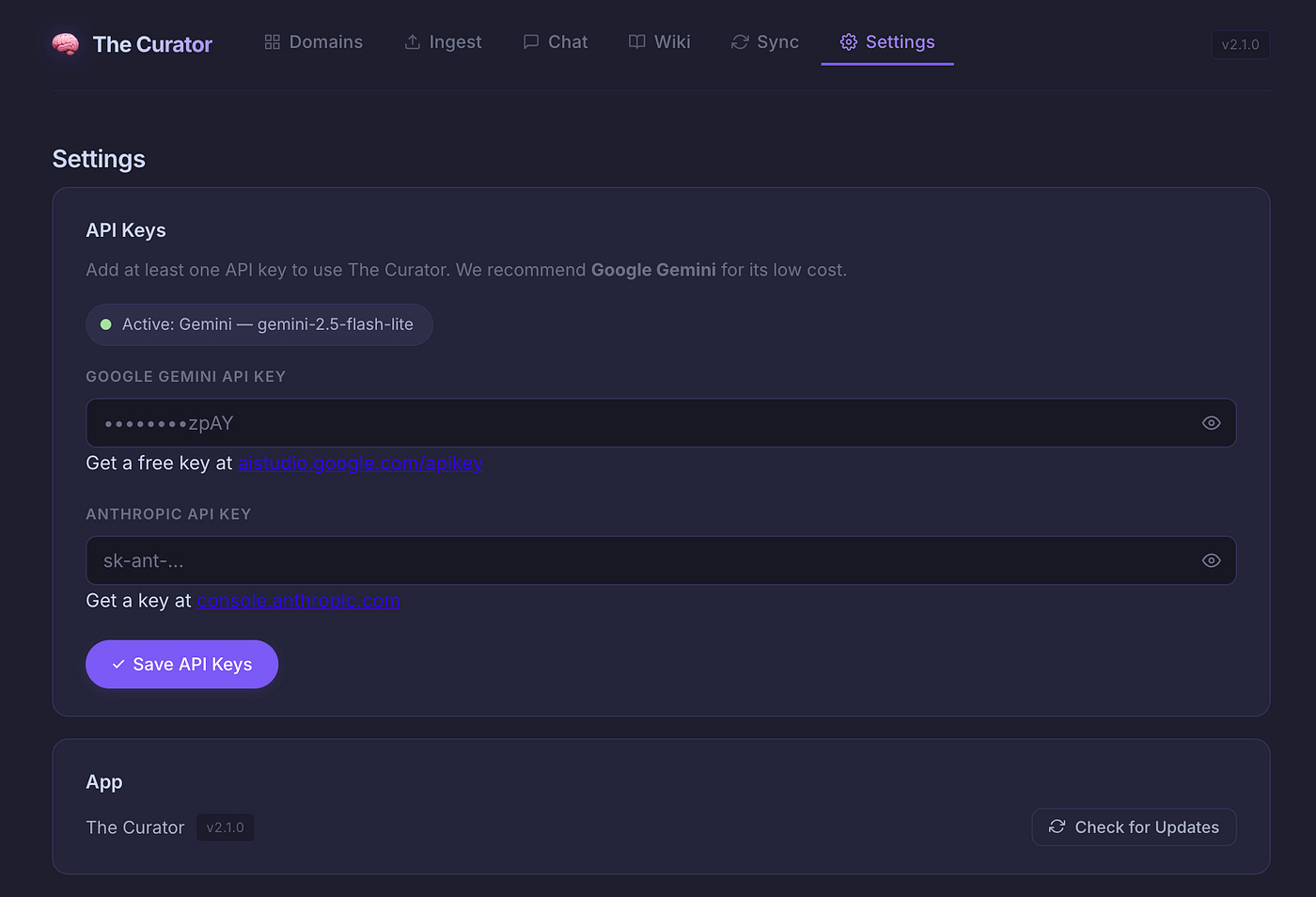
The Settings section is where you manage API keys, check the current app version, and pull updates. The app is actively developed and updates regularly.
You can find The Curator on GitHub at: github.com/talirezun/the-curator
Your Knowledge, Your Computer, Your Rules
I want to spend a moment on something that I consider non-negotiable, and that most AI tools completely ignore: ownership.
Every note you take in a cloud-based app is a hostage. The company that hosts it can change its pricing, shut down, get acquired, or simply decide to lock you out. Your years of accumulated knowledge — gone, or held behind a paywall, or suddenly part of someone else’s training data. This is not a paranoid scenario. It has happened repeatedly, and it will keep happening.
The Second Brain built with The Curator does not have this problem. In its simplest form, it is nothing more than a collection of plain Markdown files sitting in a folder on your hard drive. Open them in any text editor. Move them wherever you want. They will outlast every app you have ever used.
The Curator itself runs entirely on your local machine — there is no cloud service, no account, no subscription. The AI processing happens via API calls to your Google or Anthropic account — the data flows through your keys. And the sync system uses a private GitHub repository that only you control.
There is no possibility of being deplatformed. No risk of a company deciding your notes are a liability. No algorithmic curation of your own knowledge. No ads. No surveillance. The Second Brain is yours — completely, permanently, and technically.
In an era when the tools we rely on for thinking are increasingly owned by platforms with interests that do not align with ours, this matters more than most people realise.
The most important ideas in your life should not live on someone else’s server.
Who Is This For? The Use Cases That Surprise You
One of the things I find most fascinating about the Second Brain concept is how domain-agnostic it is. The same underlying mechanics — Atomic Decomposition, cross-referencing, network compounding — apply equally well across radically different fields. Here are a few that illustrate the breadth.
Researchers and Academics
Upload twenty or thirty papers on a research topic. The Curator extracts all the distinct methodologies, authors, and institutions. Open the Obsidian graph and look for what I call “idea collisions” — Concept nodes that appear in multiple distinct research streams but have never been explicitly connected in the literature. These visual gaps often point directly to original research questions. Query the chat to synthesise findings across your entire corpus in seconds, with citations.
Medical and Scientific Researchers
Drop in clinical trial PDFs and academic papers from different sub-disciplines. The Curator extracts Entities like genes, proteins, drugs, and compounds, alongside Concepts like pathways, methodologies, and biomarkers. The graph can reveal something a literature search never would: a compound studied in one domain that shows a pattern of efficacy relevant to a completely different field — because the visual bridging of nodes across your literature makes these lateral connections visible for the first time.
Executives and Strategists
Upload quarterly reports, competitor analyses, and meeting transcripts. Enable “Node Size by Linked Mentions” in the graph settings, and the most-referenced concepts grow largest — giving you a living heat map of where your intelligence is concentrated and where the gaps are. Query: “Synthesise the main friction points from the last twenty customer interviews.” The Curator weighs a transcript from yesterday equally with one from six months ago. No recency bias. Just the full signal.
Software Architects and Development Teams
Ingest architecture decision records, API specs, post-mortems, and README files. The app builds a dependency graph of your codebase’s decisions — not just its code. When a new team member joins and asks “Why did we choose this database over that one?”, the answer is a single query away, cited directly from the decision record written years ago. Institutional memory, preserved and queryable.
Content Creators: Writers, Podcasters, Journalists
Ingest everything you read — articles, book summaries, podcast notes, interview transcripts. When it is time to write, open the graph and look at the largest Concept nodes. Those are the themes you genuinely gravitate toward, measured not by your self-perception but by your actual reading history. A fully cited outline, generated in minutes from years of accumulated reading, rather than starting from a blank page.
Entrepreneurs and Founders
Feed the app customer interview transcripts, investor updates, market research, and competitor analyses. Build what I think of as an external board of advisors — made entirely from your own collected intelligence. If you are considering a product pivot, see which Concept nodes are growing fastest in your knowledge graph. Ground your strategic decisions in your full research history, not just the last thing you read.
Personal Growth and Self-Analysis
Ingest journal entries, book highlights, therapy notes, and podcast summaries over months and years. The app extracts recurring Entities — people, situations, environments — and Concepts — anxiety triggers, flow states, core values. Query: “What themes recur on days when I log high stress?” The Curator connects dots across months of journaling with the objectivity of a third party, revealing patterns that are invisible to the person living through them.
What Compounds Over Time
I want to close with the thing that makes this genuinely different from every other knowledge tool I have used — and why I think the long-term potential of this approach is still largely unrealised.
Most tools treat your knowledge as a static archive. You add something, and it sits there. The Second Brain treats your knowledge as a living system. Every new source you ingest does not just add a page — it enriches every related page that already exists. The Concept page for “machine learning” gets more detailed. The Entity page for a researcher you keep encountering gets richer. The connections between ideas deepen.
After a few weeks of consistent use, you notice something. The chat answers become more nuanced, because there is more to draw on. The graph becomes more revealing, because the clusters are denser. The connections you did not consciously make become visible. You start to see the shape of your own thinking in a way that is both humbling and energising.
After a few months, you have something genuinely rare: a personalised knowledge base that reflects your actual intellectual journey — your sources, your domains, your questions. No one else has this. It cannot be replicated by a search engine or a generic AI tool. It is yours.
And after years? I am not there yet with The Curator, but I have thought about it. A Second Brain built over years becomes a kind of intellectual autobiography — a record not just of what you learned but of how your understanding evolved, where your thinking contradicted itself, which ideas you kept returning to. A tool for serious long-term thinking that gets more valuable the longer you use it.
A Second Brain is not a productivity tool. It is a long-term investment in the quality of your thinking.
Getting Started
If you have read this far and something resonated — if you have ever felt the frustration of knowing that the connections between your ideas exist somewhere but you cannot find them — I want to make the path forward as simple as possible.
The Curator is open source and available at github.com/talirezun/the-curator. The installation for Mac is a single command. The AI model that powers it has a free tier. Obsidian is free. The entire system can be up and running in under fifteen minutes.
You do not need to be technical. You do not need to understand markdown, graph theory or the difference between RAG and compiling wikis. You just need to have knowledge worth keeping — and the patience to let the system compound.
I built this because I needed it. Because I was tired of reading and forgetting. Because I believed that the knowledge I accumulate over a career should serve me for decades, not disappear into a folder structure I never look at.
Andrej Karpathy gave us the pattern. I built the ingest engine. The Second Brain you build with it is entirely your own.
Start today. In a year, you will not recognise the richness of your own thinking.
About the Author
Dr. Tali Režun is a Serial Entrepreneur, Business Developer, and Academic at the forefront of frontier technologies. As Vice Dean of Frontier Technologies at COTRUGLI Business School, he leads AI innovation initiatives and shapes MBA curricula for the next generation of technology leaders. With over 30 years of entrepreneurial experience — founding and scaling ventures including The Curator, Lumina AI, Moj AI, Block Labs, CR Systems, 4thTech, Immu3, PollinationX, and Online Guerrilla — he bridges cutting-edge research in AI and Web3 with practical business transformation.
Tali’s Links
— https://talirezun.com/
— https://x.com/talirezun
— https://www.linkedin.com/in/talirezun
— https://www.researchgate.net/profile/Tali-Rezun
Disclaimer
Research and Educational Purpose
This article is published for research and educational purposes only. The content represents our personal experiences, observations, and analysis based on extensive hands-on experimentation with AI agent technologies over the past eighteen months.
No Commercial Relationships
We have not been compensated, sponsored, or otherwise financially supported by any of the companies, platforms, or tools mentioned in this article. All opinions, assessments, and recommendations are my own and based solely on independent research and practical experience.
Individual Research Required
Readers are strongly encouraged to:
Conduct their own independent research before adopting any AI agent technology
Evaluate tools and platforms based on their specific use cases, requirements, and risk tolerance
Test systems thoroughly in controlled environments before production deployment
Consult with relevant technical, legal, and security professionals when implementing AI agents in business-critical or sensitive applications
Stay informed about evolving best practices, security considerations, and regulatory requirements
No Guarantees or Warranties
While I have made every effort to ensure accuracy based on my research and experience, I make no guarantees regarding the performance, reliability, security, or suitability of any AI agent technology for any particular purpose. Technology capabilities and limitations may vary significantly based on implementation details, use cases, and environmental factors.
Evolving Landscape
The AI agent ecosystem is developing rapidly. Tools, platforms, protocols, and best practices referenced in this article may be superseded, deprecated, or fundamentally changed by the time you read this. Always verify current capabilities and recommendations with primary sources and official documentation.
Your Responsibility
You are solely responsible for evaluating whether and how to implement AI technologies in your specific context. Consider your risk tolerance, regulatory requirements, security needs, and organizational capabilities before implementation.